Everyone asks “which framework is faster?” But nobody asks “which one won’t trap me with a rare talent pool?”
Both React Native and Flutter are fast.
However, one framework connects you to a vast pool of developers, proven libraries, and widespread corporate support. The other requires hunting for good specialists, vetting niche plugins, and hoping your tooling stays maintained.
This is an honest analysis based on what we see from inside the industry. Get ready for insights to avoid the expensive mistakes: framework rewrites, painful migrations, and talent shortages that slow everything down.
Contents
- React Native in 2026: features, pros and cons
- Inside Flutter: core capabilities and hidden costs
- React Native vs Flutter comparison: 5 decisions you can’t avoid
- Is Flutter better than React Native in 2026-2028?
- When to choose React Native and when Flutter is better
- Final Verdict: which framework should you choose in 2026?
React Native in 2026: features, pros and cons
The old React Native had a bridge problem. Every time your JavaScript code needed to talk to native features such as animations, gestures, or camera access, it had to send a message across an asynchronous bridge and wait for a response. Under heavy load, that bridge thing lagged.
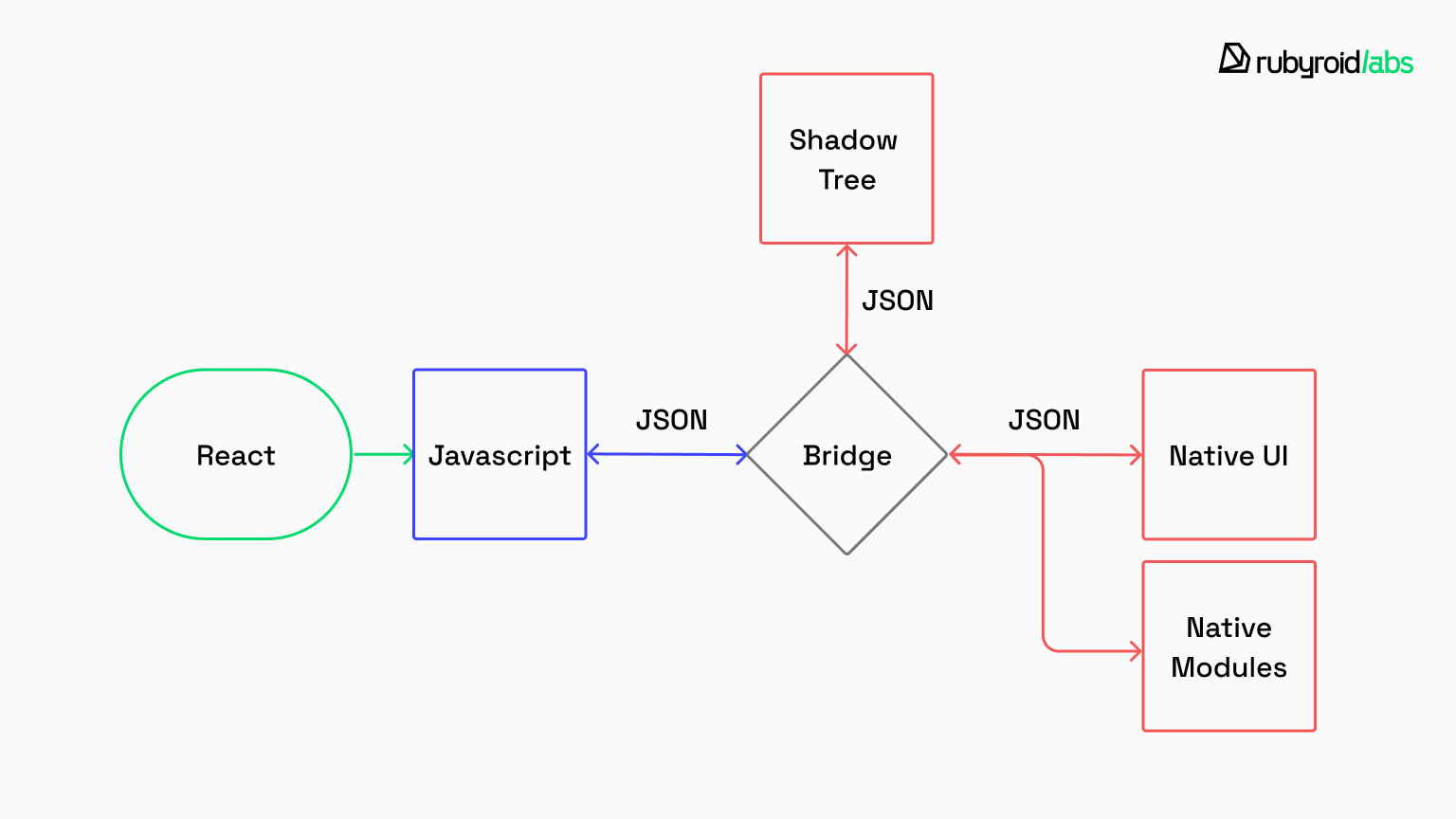
That bridge is gone now. The New Architecture replaced it with synchronous, direct calls between JavaScript and native code. No queue, no waiting, no performance penalty. Interactions that used to lag now respond immediately.
The performance gap that made developers choose between “fast to build” and “fast to use” doesn’t exist anymore. React Native today handles production-scale apps without breaking a sweat.
Here’s what the React New Architecture actually solved:
- JSI (JavaScript Interface) eliminates the lag between your code and native features. Payments process without hesitation, biometric authentication responds instantly. Your app feels native because it performs like a native with no compromises on the features users notice most.
- TurboModules load only what you need, when you need it. So, apps launch faster, and integrating tools like Stripe, Firebase, or ML models becomes straightforward instead of a maintenance headache.
- Fabric Renderer makes your app look and behave correctly on both iOS and Android without platform-specific workarounds. QA cycles shrink because you’re not chasing layout bugs across devices. Users get an app that feels genuinely native to their platform, not a clunky port.
The New Architecture transformed React Native from a shortcut into a foundation. You’re no longer trading speed for stability but get both. Costs scale predictably, maintenance stays under control, and your app performs like it was built natively.
After 10+ years delivering React Native development services, we’ve seen which architectural decisions age well and which ones create problems two years later.
React Native advantages
| Advantage | What it means | Outcome for your app/business |
| True platform “feel” | Uses real OS components. Native scroll, haptics, accessibility baked in. | Higher user trust and retention, less time “polishing” basic interactions. |
| Flexible UI without heavy UI libraries | Built-in components handle most screens. UI libraries are optional. | Faster design iterations, less tech debt from third-party UI kits. |
| Stable 60 FPS | Standard apps (lists, inputs, and nav) perform like native with the new architecture. | Smoother UI = fewer drop-offs, better reviews, less performance firefighting. |
| Standard component set | Default components cover 95% of use cases, no need to build custom inputs or lists. | Shorter time-to-market, fewer UI bugs, easier onboarding for new developers. |
| Over-the-air updates (EAS Update) | Small JS/asset hotfixes are shipped without waiting for app store review | Bug-fix cycles are quick, reducing incident costs and giving more control during launches. |
| Large hiring pool | JS/TS + React skills are widely available. | Faster hiring, easier scaling, lower staffing risk. |
React Native limitations
| Limitation | What it means | Outcome for your app/business |
| Upgrade “hell” | Upgrades are hard. With 50+ libraries, expect to burn a week of lead dev time per major version. | You must budget for regular updates, or the app will break. |
| Inconsistent UI | Native components mean iOS and Android look different by default. | You pay extra hours to override system behaviors. |
| Performance ceiling | It’s not a game engine. Heavy graphics, 3D rendering, or particle effects will choke. | Excellent for business logic, terrible for high-fidelity games. |
| Limited web/desktop support | Web and desktop builds exist but need custom work. | Don’t plan web/desktop as “free.” Budget extra time or use a dedicated web/desktop stack. |
Real-world React Native use cases
Major companies rely on the React Native framework to power their cross-platform products.
Shopify switched to React Native to break free from fragmented, specialized stacks. Now they run Shop, Inbox, and POS on a single JavaScript codebase that spans web and mobile. The payoff: they deploy hundreds of updates every year without juggling isolated teams for each platform.
Discord bet its entire mobile strategy on React Native. It was a risky move for a platform where milliseconds matter. Though, the outcome validated the decision: 98% code sharing between iOS and Android, with a 99.9% crash-free rate in production. It proves cross-platform development doesn’t mean compromising on stability.

Handling 13,000+ monthly bookings manually overwhelmed Sail Croatia‘s team. Our web CRM and React Native mobile app delivered offline-first tour management with real-time booking updates, cutting manual work by 70% across 30 automated modules while maintaining performance during peak tourist season.
These wins share a foundation: powerful framework features and access to the massive JavaScript developer pool.
Inside Flutter: core capabilities and hidden costs
Flutter handles all rendering internally. Rather than relying on iOS or Android to draw UI elements, it uses the Impeller engine to paint everything directly. Buttons, animations, and text all get rendered through Flutter’s own graphics pipeline.
This design guarantees visual uniformity: what you see on one device matches exactly what appears on another, because Flutter controls every pixel.
Here’s what that actually looks like in production
- Impeller rendering engine paints all UI elements from scratch, delivering identical visuals across devices. Your brand’s interface stays perfectly consistent, and you have complete control over how everything renders.
- Dart language compiles directly to native code for smooth runtime performance. It’s a clean, modern language designed specifically for building UI applications with strong typing and good developer tooling.
- Native device features (camera, Bluetooth, location) integrate through a plugin system. Core functionality comes from official framework plugins, with community-maintained options covering additional use cases.
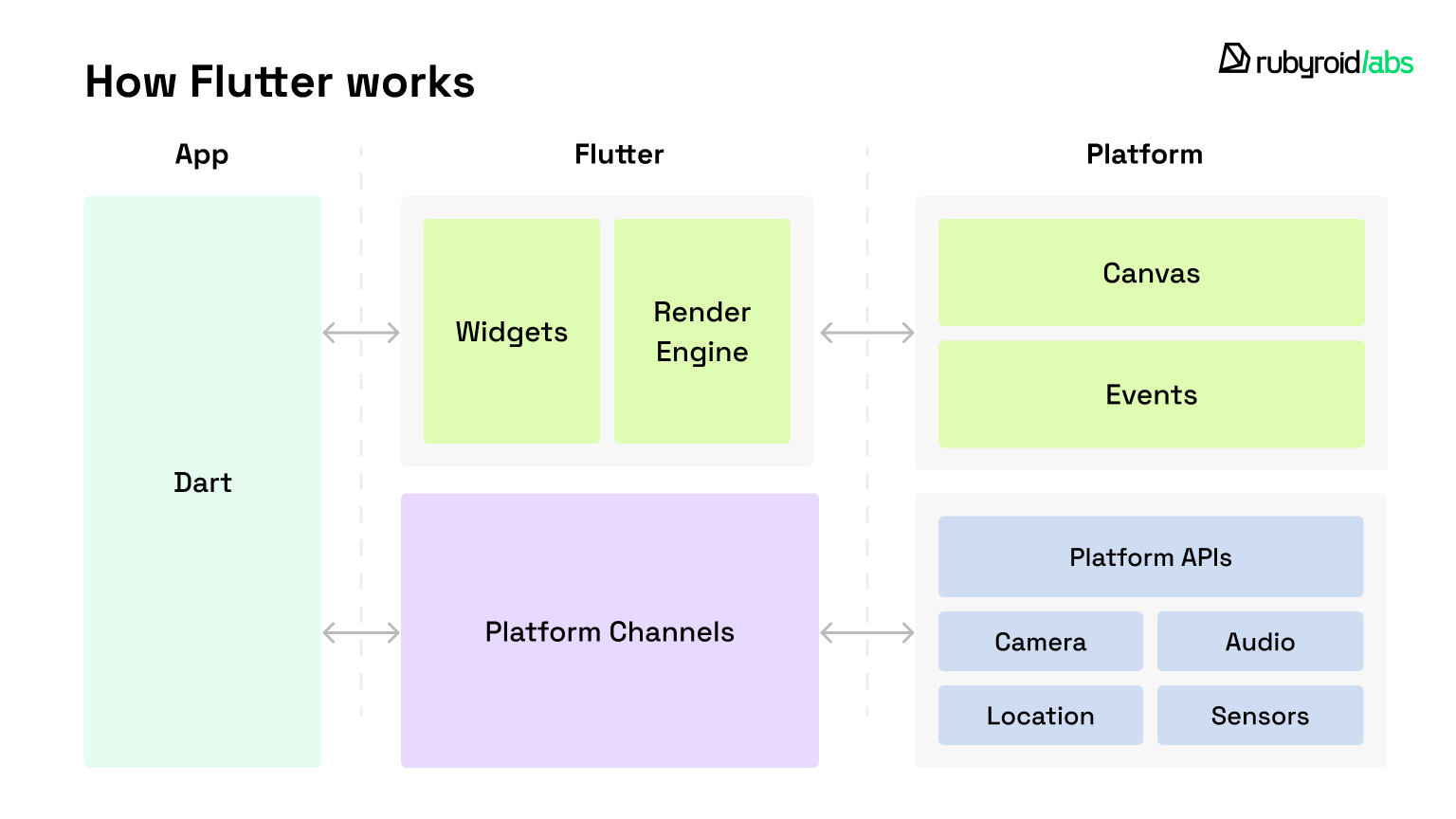
Flutter advantages
| Benefit | What it means | Outcome for your app/business |
| UI consistency across platforms | Flutter draws most UI itself, so iOS/Android behave the same. | Less design QA, fewer platform UI bugs, consistent branding. |
| High-performance motion & custom UI | Strong for complex animations and bespoke components. | Smoother “premium” feel in key flows, fewer UI workarounds. |
| Design system control | One widget library can govern the whole app. | Faster scaling across teams, less UI drift, easier maintenance. |
| Multi-platform reach (mobile + web + desktop) | One UI system can ship to more platforms. | Less duplicated UI work if you truly need all clients. |
Flutter drawbacks
| Limitation | What it means | Outcome for your app/business |
| “Native feel” takes work | Flutter draws UI itself, so some platform behaviors can feel slightly “off.” | More UX polish time to feel truly native. |
| App size can be higher | You ship Flutter’s engine with the app, so the baseline is heavier. | Higher install friction where download size matters |
| Plugins vary; edge cases may go native | You depend on packages; if one is weak or abandoned, you inherit the problem. | Timelines can slip when a plugin breaks or doesn’t cover your edge case. You may need Swift/Kotlin anyway. |
| OS quirks still apply | iOS/Android differences still exist; Flutter just changes the integration layer. | Cross-platform still needs platform QA/fixes and extra OS-specific expenses. |
| Custom wrapper overhead | If a native SDK lacks a Dart package, write Swift/Kotlin wrappers yourself. | Extra maintenance and vendor integration risk. |
| Hiring challenges | Senior Flutter talent is scarcer and often pricier than React/JS. | Harder staffing, higher costs, higher bus factor. |
| Verbose UI code | Widget trees can get deeply nested without strict structure. | Slower onboarding/reviews unless tightly structured. |
World-known companies using Flutter
Companies choose Flutter because it delivers speed, consistency, and operational efficiency across platforms.
The “My BMW” app serves 47 countries and can’t afford inconsistencies. Flutter collapsed their iOS and Android workflows into a single codebase, eliminating staggered releases and preserving the premium feel users expect from the brand.
eBay Motors chose Flutter to build a fast, data-heavy marketplace for car buyers. Sharing nearly all code between iOS and Android meant they went from concept to beta in three months, without needing separate teams per platform.
React Native vs Flutter comparison: 5 decisions you can’t avoid
React Native and Flutter share the same promise — faster mobile development, but serve different organizational needs.
There’s no universally correct answer. However, your choice determines how you develop, what you pay, and what maintenance looks like long-term. Let’s examine the specifics.
Let’s walk through each point in more detail for greater clarity.
| Feature | React Native | Flutter |
| Programming language | JavaScript / TypeScript | Dart |
| Performance model | Uses native components bridged via JSI | Custom-rendered with Impeller engine |
| UI & design flexibility | Native look & feel with OS-level components | Full control via custom-rendered widgets |
| App size | Generally smaller | Larger due to built-in rendering engine |
| Development speed | High, especially with existing React experience | High, but Dart learning curve may slow early stages |
| Developer experience | Strong tooling, JS ecosystem, hot reload | Excellent tools, hot reload, integrated UI toolkit |
| Platform support | iOS, Android, macOS, Windows | iOS, Android, Web, macOS, Windows, Linux |
| Learning curve | Easier for web teams | Slightly steeper due to Dart and custom UI concepts |
Comparison tables don’t make decisions for you. They can’t tell you which framework fits your business reality.
So instead of a spec-by-spec breakdown, let’s walk through the real forks you’ll face before you commit to a stack and see how React Native and Flutter behave in each scenario.
Fork #1: hiring & language reality
Path 1: If you need to ship in 90 days and hire fast…
Built on JavaScript/TypeScript, React Native uses the same language stack already running in most production environments. JavaScript’s consistent ranking as the world’s top programming language creates a massive candidate pool. Recruiting moves at speed, with new hires becoming productive almost immediately.
React Native developers average $113,112 annually. You’re hiring from an open market.
Path 2: If you can invest time finding specialized talent…
Flutter depends on a cleanly designed Dart, which is rarely used outside the framework. That means fewer qualified developers, slower hiring cycles, and more “we found someone, but they’re unavailable for two months” scenarios. At scale, it becomes a velocity tax.
Moreover, finding really good Dart developers takes 2-3x longer, and they cost more, averaging $120,588 annually, which is more expensive than React Native developers cost.
The constraint isn’t quality. It’s availability. Dart exists almost exclusively within Flutter’s ecosystem, so you’re recruiting from a specialist pool that doesn’t transfer skills to or from other projects.
| Where you get hurt: You hit your deadline with React Native’s open hiring pool, or you miss it waiting for the one available Dart expert to finish their current contract. |
Fork #2: the truth about performance model
Path 1: If your app is standard business logic (forms, lists, navigation)…
The New Architecture eliminates translation layers, so React Native communicates straight to the device’s C++ core. Scrolling and other interactions run at native speed because there’s no intermediary processing the commands.
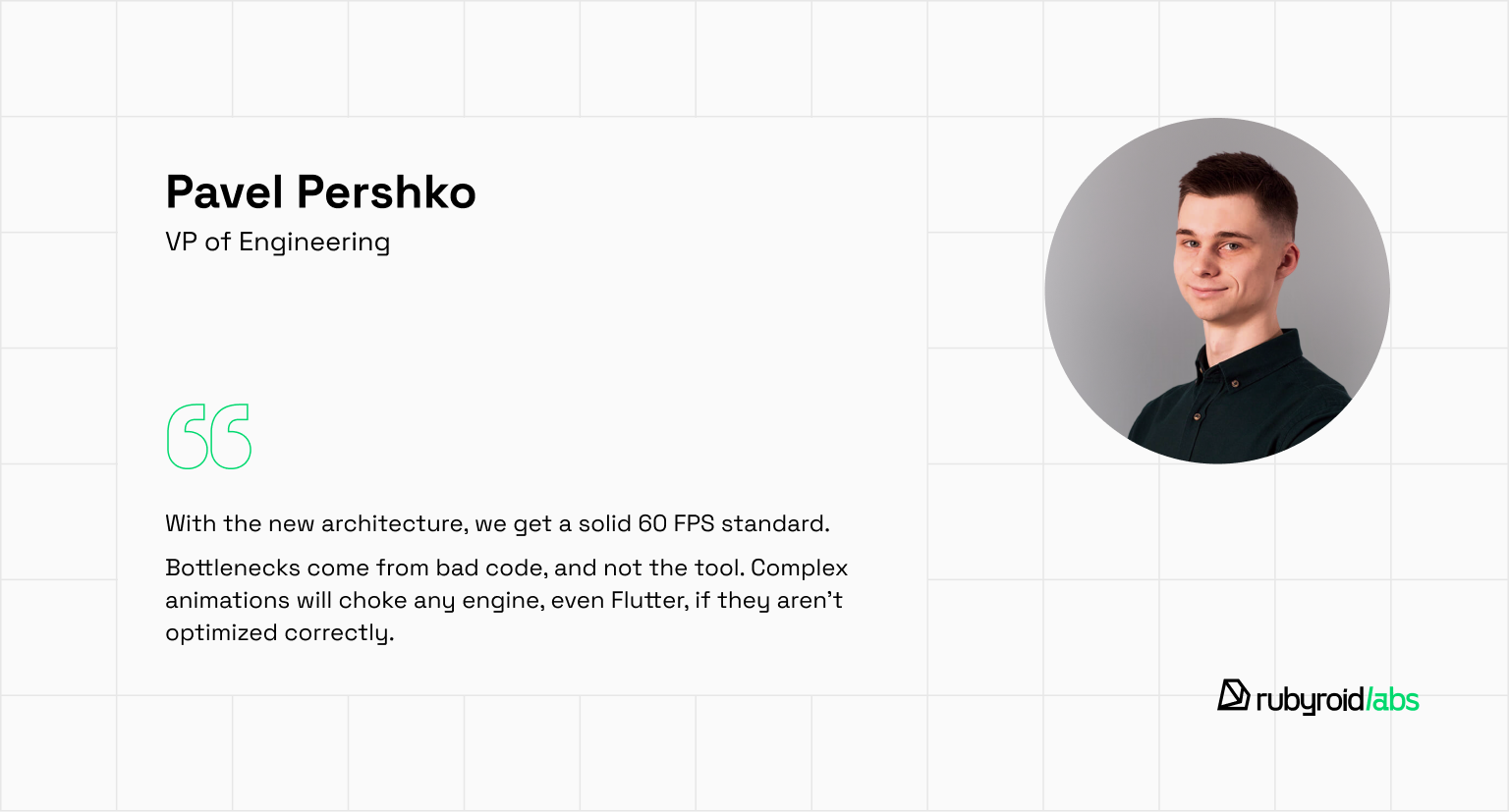
A steady 60 FPS is the industry standard for a reason. For 95% of apps, that’s exactly what users need. You don’t need a fintech app to run like a video game. Anything higher just burns battery for vanity metrics.
Here’s what our VP of Engineering, Pavel Pershko, says:
Path 2: If you’re building game-like UI or complex animations…
Flutter’s Impeller engine compiles graphics ahead of time and maintains a locked 60-120 FPS by rendering everything like a game engine. Animations stay smooth because Flutter redraws the full interface on every frame, independent of what the OS provides.
However, that “game engine” approach is often visual overkill for business apps. You’re buying control you may not need and sometimes paying with battery/CPU for polish nobody asked for.
| Where you get hurt: You burn budget chasing 120 FPS nobody notices while your battery-drained users leave one-star reviews. |
Fork #3: UI native feel vs brand control
Path 1: If users expect a platform-native feel…
React Native respects muscle memory. It renders actual native components, like an iOS button is an iOS button, automatically inheriting the platform’s physics, haptics, and behavior. You’re guaranteeing the exact tactile experience (scrolling, haptics, text inputs) that billions of users already know by heart.
The framework doesn’t try to outsmart the operating system. It’s efficient, stable, and fundamentally honest.
However, achieving identical UI on iOS and Android requires extra design and engineering effort. Platform-specific feel means platform-specific work.
Path 2: If you need pixel-perfect brand consistency…
Flutter redraws everything from scratch. Every pixel, shadow, and animation is custom-rendered. Your interface looks identical everywhere because Flutter literally draws it identically.
The benefit is a predictable, consistent UI. But here’s also the catch: Flutter apps don’t automatically inherit platform updates. When iOS introduces a new gesture pattern or Android updates accessibility features, you wait for Flutter to implement support, then integrate it yourself. You’re not building on the platform, you’re building a replica that requires constant synchronization.
| Where you get hurt: you fail when iOS updates its gesture system, Android changes accessibility standards, and you’re scrambling to manually replicate features that React Native apps got for free. |
Fork #4: native integration risk
Path 1: If your app is SDK-heavy (payments, KYC, Bluetooth, deep links)…
React Native has strong production adoption, and native integration patterns are familiar. You’ll still touch native code sometimes but you’re not fighting the platform model.
Path 2: If your app is UI-heavy and self-contained (minimal native dependencies)…
Flutter shines when everything aligns. You’ll rely on community plugins for device features like cameras, Bluetooth, or payments. When plugins are well-maintained, they work seamlessly. But when they break or fall behind OS updates, someone on your team needs to write Swift or Kotlin to bridge the gap. You’re often one unmaintained plugin away from a complete roadblock. If a maintainer disappears, you either build a custom wrapper yourself or miss your deadline.
| Where you get hurt: Flutter teams fail when a critical plugin breaks mid-sprint and nobody on the team knows native development. |
Fork #5: long-term maintenance surprises
Path 1: If you can treat upgrades as continuous work…
React Native requires this discipline. You can’t stay on old versions as Apple and Google keep moving with new OS releases, SDK requirements, and store policies. Disciplined teams do small upgrades monthly. The JavaScript ecosystem moves fast, but your team likely already manages this on the web.
Path 2: If you’re prepared for manual platform synchronization…
Flutter requires this reality. You manually track what iOS and Android ship, wait for Flutter to catch up, then integrate updates yourself. Platform evolution doesn’t flow through automatically. Flutter’s isolation from native components means constant synchronization work.
| Where you get hurt: React Native teams fail when they skip upgrades and face catastrophic migrations under deadline. Flutter teams fail to sync platform updates while competitors ship faster. |
Where you end up: most likely failure modes
Now, let’s see the worst scenarios you may face. It’s a bit hyperbolized to help you understand the difference.
React Native worst case:
- You skip quarterly upgrades to “focus on features.” Eighteen months later, you’re three major versions behind, blocked by breaking changes in core dependencies, and facing a two-month migration while Apple rejects your build for using deprecated APIs. Your team is stuck rewriting navigation, authentication, and native modules under deadline pressure.
How to avoid it: Continuous upgrade cadence (monthly/quarterly), strict dependency hygiene, and maintaining native integration expertise in-house.
Flutter worst case:
- Your senior Dart developer quits mid-project. Hiring a replacement takes three months. Meanwhile, a critical payment plugin breaks after an iOS update, and nobody on your team knows Swift. You’re simultaneously blocked on hiring, blocked on shipping, and manually rewriting native bridges while your competitor with a JavaScript team ships weekly.
How to avoid it: Hire native iOS/Android expertise early, audit plugin maintenance health before commitment, and budget 20% sprint capacity for custom wrapper work.

Is Flutter better than React Native in 2026?
Here we want to share our experience from 10+ years of mobile app development. Unfortunately, we haven’t seen a truly healthy Flutter project yet.
Lately, we have had clients constantly coming to us for rewrites, specifically migrating from Flutter to React Native. We aren’t surprised, because the scenario is almost always the same:
- A project owner is impressed by Flutter’s performance and UI capabilities during the demo phase.
- As the app grows, bugs appear. Critical native features or third-party SDKs turn out to be unsupported or unstable in Flutter.
- Due to a lack of truly GOOD specialists, the codebase becomes messy and buggy.
- The app becomes too expensive and risky to extend, leaving the business stuck.
Our VP of Engineering, Pavel, shares his opinion:

For example, one of our clients is a fintech platform that enables users to split purchases across multiple payment cards in real-time. Their production app was built in Flutter, but they faced serious challenges: outdated code, critical bugs, and a severe shortage of qualified Flutter developers who could maintain or scale the product.
We helped them rebuild their app from the ground up in React Native, including UX improvements, and successfully delivered it in 6 months. The switch gave them better stability, easier maintenance, and long-term confidence in the platform.
Just look at the before and after.
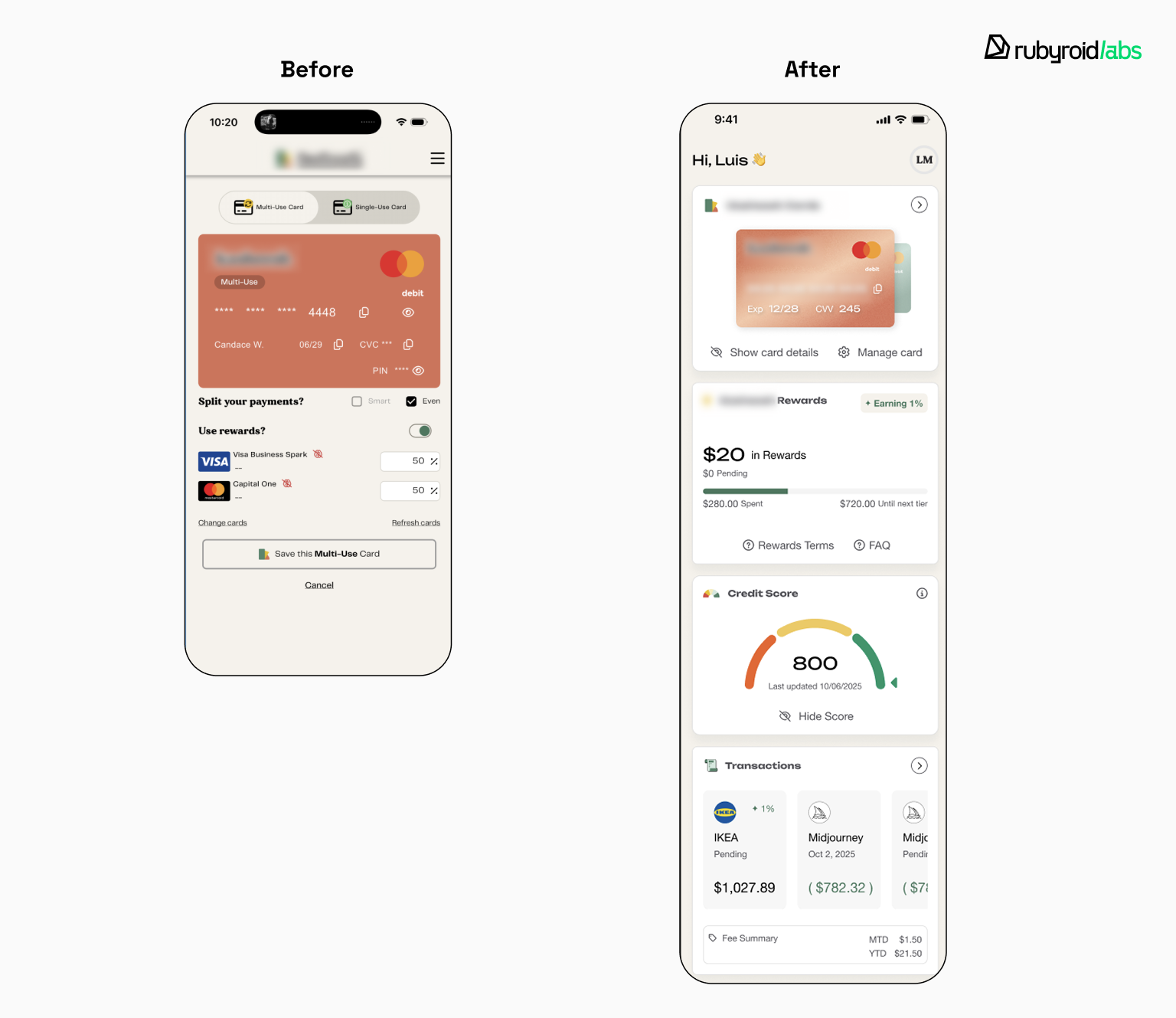
So, to answer the question, is Flutter better? Not at all. While it looks great in a controlled environment, it fails the stress test of long-term maintenance, hiring, and deep system integration.
When to choose React Native and when Flutter is better
Let’s be practical. In 2026, the real choice isn’t found in a list of features. Instead, it comes down to a fundamental difference in how you approach your product.
React Native is built for serious business apps. Fintech, healthcare, or e-commerce — these are the products where users expect native behavior, where reliability isn’t optional, and where looking professional matters as much as working flawlessly.
Flutter works for games and visually experimental apps where custom UI and animation control matter most. While Flutter powers some production apps, its ecosystem and tooling are less mature for enterprise-grade products that demand long-term stability and deep platform integration.
Here is a breakdown of how to choose based on your specific needs.
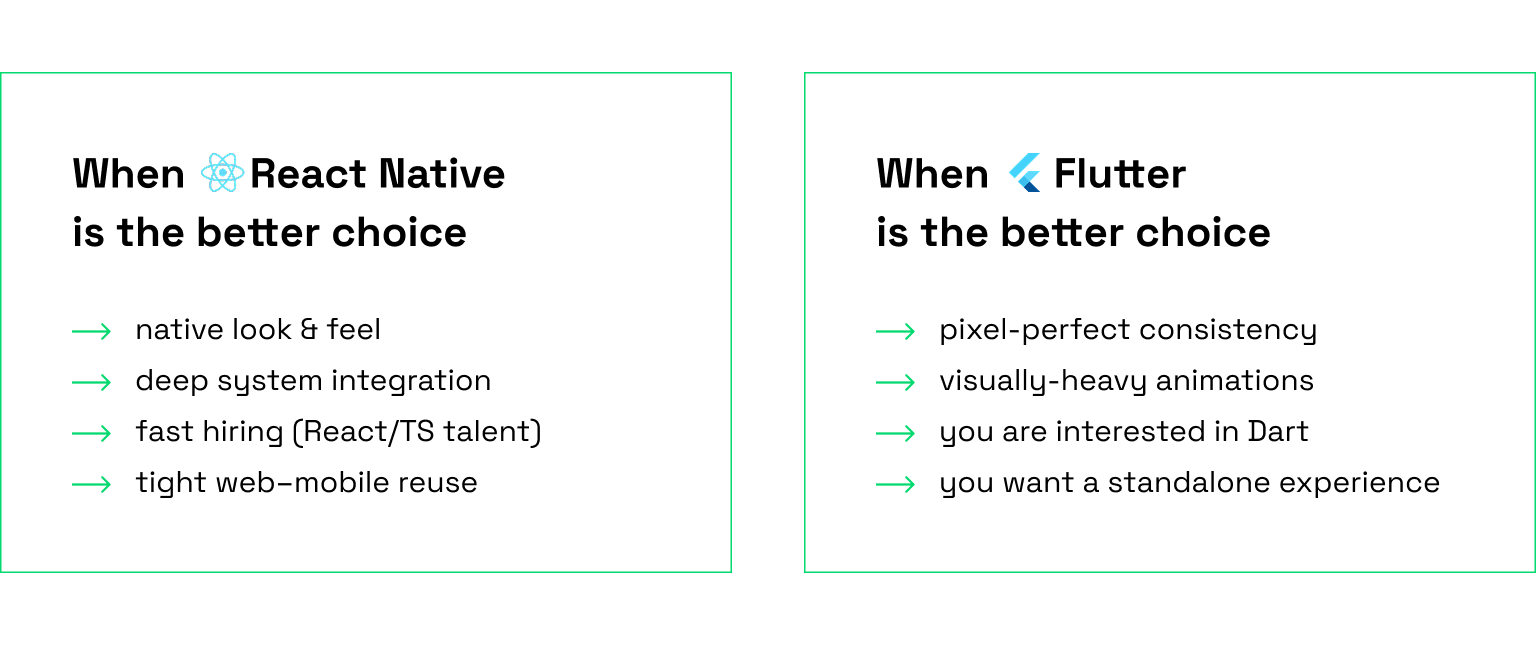
React Native works best when:
- Your app should feel like it belongs on the user’s device. React Native pulls UI components directly from iOS and Android, so interactions match what users already know.
- Platform integration matters to your product. The framework communicates naturally with device APIs and system features, which simplifies maintenance as operating systems update.
- Hiring speed impacts your roadmap. JavaScript and TypeScript developers are plentiful, so expanding your mobile team doesn’t require months of specialized recruiting.
- Your web and mobile products share DNA. When both sides use similar architecture, state management, and release cycles, React Native creates a coherent technical ecosystem—especially valuable if your organization already runs on JavaScript.
Flutter works best when:
- Visual consistency across platforms is non-negotiable. Flutter renders everything itself, guaranteeing your interface looks identical whether it’s running on a three-year-old Android or the latest iPhone.
- You’re building something visually ambitious. Apps with heavy animation, unconventional layouts, or artistic interfaces benefit from Flutter’s rendering control—especially when standard platform UI patterns don’t fit your vision.
- Your team can commit to a specialized stack. Dart has a learning curve, but teams willing to invest get access to Flutter’s cohesive tooling and predictable performance characteristics.
- The app exists as its own environment. Flutter excels at self-contained experiences: design tools, casual games, utilities, where adhering to platform conventions isn’t critical to user expectations.
React Native and Flutter both deliver fast, production-ready apps. The difference is in what trade-offs align with your priorities.
If you’re uncertain, test the decision against your actual constraints: how complex is your UI, what third-party tools do you need, how quickly can you staff the team, and where is your product headed in 18 months? Building a proof-of-concept with your riskiest screen or integration will surface issues before you’re locked in.
Final Verdict: which framework should you choose in 2026-2028?
Your framework choice shapes everything that comes after: how fast you ship, who you can hire, and whether technical constraints start dictating product decisions.
Answer these questions to clarify which framework matches your reality:
- Planning to scale quickly using existing web development talent? → React Native builds on JavaScript/TypeScript, accelerating hiring and eliminating ramp-up time.
- Building animation-heavy interfaces where pixel-perfect control outweighs platform conventions? → Flutter delivers consistent performance for graphics-intensive applications.
- Do your users rely on standard platform interactions that evolve with OS releases? → React Native leverages native UI elements, inheriting system updates without manual intervention.
- Does your application depend heavily on native integrations (payment systems, identity verification, hardware connectivity)? → React Native connects to platform SDKs directly, avoiding third-party plugin vulnerabilities.
- Are you prepared to track and implement platform changes yourself rather than receiving them automatically? → Flutter prioritizes visual uniformity at the cost of manual platform synchronization.
Ultimately, the “best” framework is the one that survives the next 3-5 years of your business roadmap.