The invisible cost of AI-generated code: a guide to React Native stabilization

The rise of conversational AI has made it possible to build MVPs with limited engineering expertise purely through natural language prompts. While AI-generated code is ideal for testing hypotheses, the resulting React Native applications struggle to survive the transition to production and bring additional costs and risks.
We’ll explore why working MVP is not the same as production-ready product, whether AI-written code is inherently problematic, and how to turn an AI-generated MVP into a scalable, maintainable product.
Vibe coding vs AI‑assisted development: two ways to generate code with AI
AI-generated code may be produced in two ways: AI-assisted development and vibe coding.
The difference between them lies in the level of human involvement required to produce, review, and integrate that code.
What is vibe coding, and why did it become so popular?
Vibe coding refers to a style of development where a person explains what they want, the AI generates the code, and the workflow continues through fast iterations and feedback loops.
This methodology prioritizes immediate results, even if the implementation is imperfect or poorly understood internally. Often, the person generating the code may not fully understand how the system works beneath the surface.
What made vibe coding explode in popularity is that it lowers the barrier to software creation for non-engineers who want to test ideas.
In many cases, the generated code only needs to work long enough to validate an assumption. And for that purpose, it’s quite efficient.
How does AI-assisted development differ?
AI-assisted development takes a far more controlled approach to AI-generated code.
In this case, AI functions as a collaborator. Engineers still:
- define the architecture;
- validate security implications;
- review generated outputs;
- remain responsible for long-term maintainability.
AI handles repetitive implementation work such as scaffolding, boilerplate generation, documentation, refactoring assistance, and test creation. The developer still owns the system itself, but accelerates the workflow. We’ve explored this more deeply in our article on AI in software development.
Does AI-generated code make software engineering worse?
Not necessarily.
AI-generated development is not inherently reckless or low-quality. In most cases, it is extraordinarily effective. The quality of such code depends more on the person using AI.
Experienced engineers know when to trust generated code. They understand architecture well enough to recognize AI code risks. The essence of their work is to build the architecture that will work in the long run.
Vibe coders without deep technical knowledge most likely won’t be able to trace which part of the code does what, which means they’ll miss logic flaws that could lead to errors and crashes.
And that may be the most important distinction in the entire discussion.
If AI-generated code is efficient, where do the hidden costs come from?
AI-generated development introduces new operational costs.
The first category is Token Consumption Costs. Long prompts, large context windows, verbose outputs, and repeated retries can multiply expenses.
The second category comes from the fact that AI coding tools rarely perform a single isolated action. One request may trigger:
- repository analysis;
- documentation lookups;
- reasoning loops;
- testing pipelines;
- API calls;
- multiple additional model invocations behind the scenes.
To illustrate, let’s calculate the API costs using realistic pricing for a basic code generation model ($1.25 per 1 million input tokens / $10.00 per 1 million output tokens).
Let’s say, we want to give a simple instruction into AI assistant:
“Add a password reset route to the authentication controller and email the user a temporary link”
To a human, this is one request, to an AI agent, this is a multi-step task. The tool must send the entire context (your codebase rules, the previous conversation, and the files it reads) back to the API every time it takes a step.
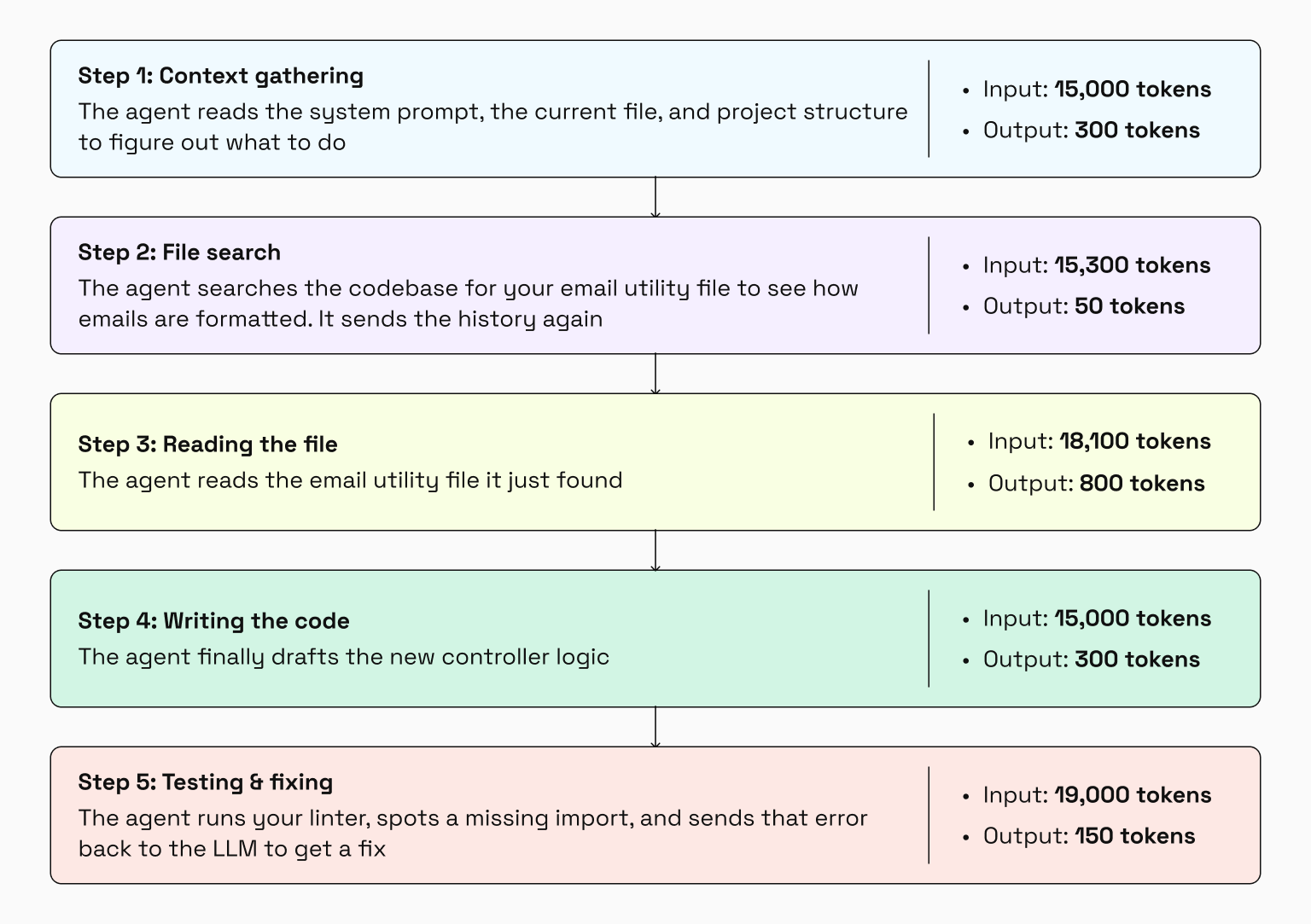
By the time the AI says “done”, it makes five API calls with a total of ~85,400 input tokens and ~1,400 output tokens. Let’s calculate the cost for this single feature request:
- Input cost: (85,400 / 1,000,000) * $1.25 = $0.10675
- Output cost: (1,400 / 1,000,000) * $10.00 = $0.014
- Total cost: $0.12
$0.12 sounds negligible until you scale it to daily workflows. An active user relying heavily on AI might trigger 30 of these agentic loops per day.
- Daily cost: 30 loops * $0.12 = $3.60
- Monthly cost: $3.60 * 20 workdays = $72
If one person uses it during a year, that translates to $864 in raw API compute. If you are looking to map out your overall expenses, see our startup guide on how to evaluate the cost of an AI project.
There is also the growing cost of AI infrastructure. Many AI-assisted systems rely on vector databases, embeddings, and retrieval pipelines to make your codebase searchable. As projects scale, storing and continuously re-indexing this data becomes a recurring operational expense.
But infrastructure costs are easier to predict than production and support costs.
Every authentication issue, broken payment flow, or failed API integration creates work for engineers, support teams, and product managers. Additional time is directed toward investigation, hotfixes, and customer communication. Unstable applications increase user churn and reduce customer trust.
Then comes the less visible cost: technical debt.
AI systems optimize for plausibility. Generated code may appear correct while introducing duplicated logic, inconsistent abstractions, weak error handling, or security vulnerabilities into the broader system.
Without experienced engineers reviewing and refining those outputs, short-term velocity can become long-term React Native maintenance overhead.
And it is precisely this last problem that we will focus on next.
Why AI-generated MVPs break in production
For many vibe coders, success means that the application compiles and the interface behaves correctly on a local machine. But production engineering operates under a different definition of stability.
What does “production-ready” mean?
A production-ready application must survive real-world conditions. That means the system must:
- handle real user data safely;
- authenticate users securely;
- recover gracefully from failures;
- behave predictably under edge cases;
- scale under concurrent traffic;
- remain maintainable and auditable long after launch.
A production system must continue working after unpredictable interactions, API failures, malformed requests, unstable networks, version upgrades, and changing business requirements.
These are the qualities difficult to achieve when AI-generated systems are built without strong engineering oversight.
Why does vibe-coded software struggle in production environments?
Today, AI agents can compile and self-correct code, but they still lack holistic foresight. Because they rely on statistically plausible patterns to solve immediate tasks, an experienced engineer must compensate for this narrow focus through system design, security reviews, and production hardening.
Vibe coders tend to skip those layers entirely. As a result, the generated app may hide serious operational weaknesses underneath.
Authentication flows are a common example. AI-generated apps frequently contain sessions that never expire properly, incorrectly validated JWT tokens, weak password reset flows, missing rate limiting, or improperly isolated user data.
AI tools are good at writing basic SQL queries, but have difficulties with complex, distributed data integrity. They rarely implement proper multi-step transactional rollbacks unless explicitly prompted, which leads to partial writes and data corruption at scale.
Error handling is equally fragile. LLM-generated code tends to optimize heavily for the “happy path”. But production systems don’t operate under perfect conditions. What happens if an API request times out halfway through checkout? What if a third-party service returns a 503? What if a user submits the same form twice?
In many vibe-coded systems, those situations were never considered during implementation. Worse yet, when AI does generate error handling, it often over-corrects by wrapping code in generic try-catch blocks that swallow exceptions entirely.
Beyond this, vibe-coded software is vulnerable to hallucinated dependencies. LLMs frequently invent packages, helper libraries, or SDK methods that sound completely legitimate but do not exist.
To a vibe coder, it doesn’t look suspicious, so this blind trust has given rise to a new supply-chain attack vector known as slopsquatting.
| Attackers analyze the fake package names that AI systems commonly hallucinate during code generation → Pre-register those exact, non-existent names on public registries like npm or PyPI → Attach malicious payloads to them. |
When a vibe coder copies and runs an AI-generated install command, they may unknowingly pull malware directly into their local environment, CI/CD pipeline, or production infrastructure.
Why do mobile applications hit these problems faster than web apps?
Mobile frameworks like React Native depend on native platform integration, bridge layers, threading models, hardware APIs, and device-specific runtime behavior. AI-generated mobile code may fail because it lacks awareness of those native constraints.
This problem became even more severe after recent architectural changes in React Native itself. Modern React Native versions rely on JSI, Fabric, and TurboModules instead of the older Bridge-based architecture that dominated earlier codebases.
Unfortunately, many LLM training datasets remain saturated with outdated pre-2024 React Native patterns. As a result, AI tools still regularly generate legacy bridge-dependent implementations that are incompatible with modern React Native environments.
An experienced mobile engineer can identify outdated bindings, debug native crashes, adapt build configurations, and repair platform integrations. A vibe coder usually cannot. To mitigate this transition risk, many companies rely on an outsourced React Native development agency to clean up the native boundaries.
Mobile development itself brings complexity that AI-generated apps often fail to handle:
- Mobile apps rely on Gradle, CocoaPods, platform SDKs, and OS-level integrations. AI systems can suggest incompatible packages, deprecated build configurations, or conflicting peer dependencies.
- AI-generated mobile code frequently violates platform threading rules by triggering UI updates from background threads, mishandling native event emitters, or creating race conditions during initialization.
- Mobile failures are significantly more expensive than web failures. An unstable production release can temporarily lock an entire user base while the team waits for a new binary to pass store review.
- Device fragmentation creates additional instability because mobile applications run on hardware with different screen dimensions, memory limits, OS behaviors, permission systems, and performance constraints.
And nowhere does that instability surface faster than in React Native applications operating across mobile ecosystems.
Can an AI-built app be saved?
The production risks we discussed earlier may lead to a conclusion: perhaps the safest solution is to start over. But we rarely recommend a complete rewrite.
The question is whether the unstable parts of the system can be identified, isolated, and corrected. In many cases, they can.
What is React Native stabilization?
React Native stabilization is the process of transforming a fragile prototype into a secure, predictable, maintainable, and production-ready mobile application.
A stabilized application should be able to withstand production workloads, support future development, and evolve without accumulating uncontrolled React Native technical debt.
The exact implementation differs between projects, but generally follows the same sequence of engineering activities.
Phase 01. React Native code audit, security hardening, and infrastructure review
Most AI-generated MVPs arrive with some combination of security vulnerabilities, unstable dependencies, and infrastructure misconfigurations.
The first stage therefore focuses on a comprehensive audit of the codebase and supporting systems.
Our engineers typically review:
- authentication and authorization flows;
- API security configurations;
- secrets management practices;
- dependency health and package vulnerabilities;
- payment verification logic;
- error-handling mechanisms;
- input validation and sanitization;
- logging and monitoring configurations.
They remove hardcoded API keys, pin and lock dependency versions, upgrade or replace vulnerable packages. All the sensitive user information is reviewed to ensure it is not leaking into logs, monitoring services, or third-party platforms.
This phase establishes a secure technical baseline for everything that follows.
Phase 02. Architectural restructuring and type safety
Vibe-coded React Native projects are architecturally inconsistent because they are created through independent prompt sessions. Similar problems are solved in different ways throughout the codebase, leading to overlapping responsibilities.
The second React Native app stabilization phase focuses on restoring structure.
- Large components are broken into smaller units with clearly defined responsibilities.
- Shared functionality is extracted into reusable modules.
- API communication is separated from presentation layers.
- State management is decoupled from user interface logic.
At the same time, engineers can migrate loosely typed JavaScript code toward stricter TypeScript standards.
During this process, they look for:
- duplicated business logic;
- oversized components;
- excessive prop drilling;
- inline styling patterns;
- uncontrolled state propagation;
- unnecessary component re-renders.
Future developers should be able to understand, modify, and extend the application without reverse-engineering hundreds of lines of generated code. A clean architecture also improves future AI-assisted development because generated code receives clearer contextual boundaries and integration points.
Phase 03. React Native modernization and architecture alignment
As we’ve mentioned earlier, large language models continue to generate code influenced by older React Native architectures. As part of stabilization, engineers evaluate whether the application is aligned with the modern React Native stack. This can include:
- upgrading React Native itself;
- enabling the New Architecture;
- validating Fabric compatibility;
- reviewing TurboModule support;
- replacing outdated native integrations;
- removing custom bridge implementations;
- auditing third-party library compatibility.
Particular attention is paid to native modules because they are often the first place where legacy React Native patterns break. Read more on why skipping framework orchestration represents a legacy risk in React Native.
Phase 04. Performance optimization and runtime stability
The aim of this phase is to understand how the application behaves under workloads. Engineers analyze:
- JavaScript thread utilization;
- memory consumption;
- rendering performance;
- animation execution;
- image loading behavior;
- network activity;
- startup performance.
In AI-generated systems, you’ll often see the same performance mistakes repeated: inefficiently rendered large lists, images loaded without caching, heavy computation running on the JavaScript thread, event listeners lingering after unmount, and timers ticking away long after they should have stopped.
Phase 05. Automated verification and CI/CD implementation
The final phase is creating systems that continuously protect AI code quality.
Engineers introduce automated testing, static analysis, dependency scanning, security validation, and CI/CD workflows that evaluate every change before it reaches production.
This typically includes:
- unit tests for business logic;
- integration tests for critical user flows;
- automated security checks;
- linting and static analysis;
- build validation pipelines;
- deployment automation.
The goal is to replace manual verification with repeatable engineering controls.
As these phases demonstrate, most AI-generated MVPs are not beyond repair. Stabilization creates the conditions necessary for sustainable development, so the app transforms into a platform ready for future growth.
Our React Native stabilization framework: a live-code example
Let’s take AI-generated code and walk through how our experienced engineer refactors critical areas. This example focuses on one part of stabilization: architectural restructuring and maintainability improvements within a single React Native screen.
Here’s a simplified onboarding generated by Claude for a React Native application built with Expo Router with the specific structural problems we’ll address.
The example itself is intentionally simple. Yet even at this scale, generated code begins accumulating technical debt without clear architectural constraints and engineering standards.
// app/onboarding/index.tsx (~110 lines)
// Anti-pattern: A monolithic block of data, logic, and presentation.

const slides = [
  { id: '1', title: 'Pay Smarter', /* ... */ image: require('./assets/slide1.png') },
  // ...
];

export default function OnboardingScreen() {
  // ...
  const completeOnboarding = async () => {
    // Anti-pattern: Hardcoded magic strings for storage keys and routes.
    await AsyncStorage.setItem('onboarding_completed', 'true');
    router.replace('/(tabs)/home');
  };

  // Anti-pattern: Inline styles everywhere, no theme or design system.
  // Anti-pattern: viewabilityConfig object recreated on every render.
  // Anti-pattern: The subtitle text is never rendered—the AI simply forgot it.
  return (
    <View style={{ flex: 1 }}>
       {/* ... */}
    </View>
  );
}
The challenge is that the entire onboarding flow lives inside a single file of roughly 110 lines that combines UI rendering, navigation, animation handling, storage operations, onboarding content, and application configuration.
Step 0. The AI-generated version contains structural risks
- Onboarding data lives directly inside the screen file. Every future content change now requires touching production code.
- Routes and storage keys are hardcoded. A typo in a single location can break onboarding completion flows, and finding these issues becomes increasingly difficult as the application grows.
- Business logic and presentation are tightly coupled. This makes automated testing difficult and slows future feature development because developers cannot modify behavior without touching interface code.
- Inline styles are scattered throughout the component. Consistent design systems become harder to maintain, and introducing themes or design updates requires editing multiple areas of the codebase.
- TypeScript safety is largely absent. Problems that could be caught during development are instead discovered during manual testing or by end users in production.
- Reusable UI elements are embedded directly inside the screen. Similar functionality will likely be rebuilt elsewhere instead of reused.
As a result, even relatively small product changes can become disproportionately expensive. A new onboarding flow for another user segment would likely require duplicating or rewriting large portions of the screen.
Step 01. Remove fragile dependencies on hardcoded values
Before touching architecture, we eliminate what are often called “magic strings”: hardcoded routes, storage keys, dimensions, and configuration values scattered across the application.
Instead of storing onboarding routes directly inside components:
router.replace('/(tabs)/home');we centralize them:
export const ROUTES = {
  HOME: '/(tabs)/home',
} as const;
The same applies to storage keys:
export const STORAGE_KEYS = {
  ONBOARDING_COMPLETED: 'onboarding_completed',
} as const;
We also move onboarding data into dedicated configuration files and introduce explicit TypeScript interfaces for every slide.
Future developers now have a single source of truth for application constants. Renaming a route becomes a one-line change. TypeScript immediately reports missing fields when onboarding content evolves.
More importantly, future product changes become significantly cheaper because configuration and business logic are no longer mixed together.
Step 02. Separate business logic from presentation
Once constants are isolated, we focus on one of the most common problems in AI-generated React Native projects: oversized components.
The original screen manages:
- onboarding state;
- animation state;
- navigation;
- AsyncStorage operations;
- carousel behavior;
- UI rendering.
Everything lives inside a single component. During stabilization, this logic moves into a dedicated hook:
export const useOnboarding = (): UseOnboardingReturn => {
  // onboarding state
  // navigation logic
  // storage handling
  // event handlers
};
When business logic is isolated, it becomes independently testable. For example, onboarding completion can now be verified without rendering a screen:
await AsyncStorage.setItem(
  STORAGE_KEYS.ONBOARDING_COMPLETED,
  'true'
);
The onboarding flow becomes easier to validate, easier to debug, and easier to modify. This directly reduces the cost of future releases because engineers can verify onboarding behavior without manually testing the entire screen after every change.
Step 03. Turn UI fragments into reusable components
AI-generated screens often contain repeated interface elements embedded directly inside larger files. In our example, the onboarding slide and pagination indicators are extracted into standalone components.
The slide becomes:
<OnboardingSlide item={item} />The pagination becomes:
<PaginationDots
  count={slides.length}
  currentIndex={currentIndex}
  scrollX={scrollX}
  slideWidth={SCREEN.WIDTH}
/>
The pagination component no longer knows anything about onboarding. It simply renders dots for any carousel. That means it can be reused elsewhere in the product.
Step 04. Reduce the screen to orchestration
After the previous refactors, the onboarding screen itself becomes smaller. The original file contained more than 100 lines mixing responsibilities. Now it shrinks to about 45 lines, and its purpose becomes singular and clear: to wire the logic from the hook to the UI components.
Instead of implementing onboarding behavior directly, the screen composes existing building blocks:
// app/onboarding/index.tsx (~45 lines, pure composition)
// Effect: The screen is now an orchestrator, not a source of logic or style.
// Reading this file tells you exactly what the screen does at a glance.
const VIEWABILITY_CONFIG = { viewAreaCoveragePercentThreshold: 50 };

export default function OnboardingScreen() {
  const {
    slides, currentIndex, isLastSlide, scrollX, flatListRef,
    handleScroll, handleViewableItemsChanged, handleNext, handleComplete,
  } = useOnboarding();

  return (
    <View style={styles.container}>
      <TouchableOpacity onPress={handleComplete} style={styles.skipButton}>
        <Text style={styles.skipText}>Skip</Text>
      </TouchableOpacity>

      <Animated.FlatList
        ref={flatListRef}
        data={slides}
        onScroll={handleScroll}
        onViewableItemsChanged={handleViewableItemsChanged}
        viewabilityConfig={VIEWABILITY_CONFIG}
        renderItem={({ item }) => <OnboardingSlide item={item} />}
        // ... other props
      />

      <PaginationDots
        count={slides.length}
        currentIndex={currentIndex}
        scrollX={scrollX}
        slideWidth={SCREEN.WIDTH}
      />

      <TouchableOpacity
        onPress={isLastSlide ? handleComplete : handleNext}
        style={styles.button}
      >
        <Text style={styles.buttonText}>
          {isLastSlide ? 'Get Started' : 'Next'}
        </Text>
      </TouchableOpacity>
    </View>
  );
}
If a designer changes the Skip button’s position, it’s a single, isolated change. If the product team wants an A/B test with a different onboarding flow, we can swap out the useOnboarding hook without touching a single UI component.
What changed?
| Raw AI output | After stabilization | |
| Screen file size | ~110 lines | ~45 lines |
| Unit-testable logic | ❌ | ✅ (hook and storage layer) |
| Reusability | ❌ | ✅ Components and hook are portable |
| Risk of a string typo | High (runtime error) | Significantly reduced (TypeScript validation) |
| Single responsibility | ❌ | ✅ (each file has one role) |
The codebase starts exhibiting characteristics of React Native production readiness:
- responsibilities are clearly separated;
- logic is testable;
- components are reusable;
- TypeScript enforces contracts;
- future changes become predictable.
And this example covers only a small onboarding screen. Even at this scale, we uncovered architectural issues and maintainability problems.
In a production application with thousands of lines of business logic handling user accounts, payments, and permissions those same issues become harder to identify, debug, and correct. That is the reason why stabilization is indispensable as a product grows.
Signs your AI-built MVP needs stabilization
AI creates value, especially when building prototypes or accelerating repetitive implementation work. The problem is that “working” and “production-ready” are not the same thing.
A useful question to ask after any AI-generated implementation is:
If I need to add a new onboarding slide, change a route, update a business rule, or write a test next month, how many files will I need to open?
If the answer is “more than one”, it may be time to think about stabilization.
Other warning signs tend to appear as well:
- Similar functionality is implemented differently across the codebase.
- Business logic is mixed directly into UI components.
- Constants, routes, API endpoints, and configuration values are hardcoded.
- Components become larger every time a new feature is added.
- Small changes produce unexpected side effects in unrelated areas.
- Testing feels difficult or is avoided entirely.
- Nobody feels confident making changes without manually testing everything afterward.
These are often symptoms that your app has functionality, but lacks structure. The good news is that AI can help solve many of these problems as well.
AI accelerates implementation, engineers provide architectural judgment. The stronger the technical foundation behind the prompts, the more valuable the AI-generated output becomes.
This is exactly the approach our engineers take at Rubyroid Labs. They combine the speed of AI-assisted development with deep technical expertise: using AI to automate specific tasks while keeping architectural control firmly in human hands.
The result is a double win for clients: faster delivery and fewer engineering hours spent.