October 2026 cyberattacks: critical vulnerabilities and lessons for safer apps

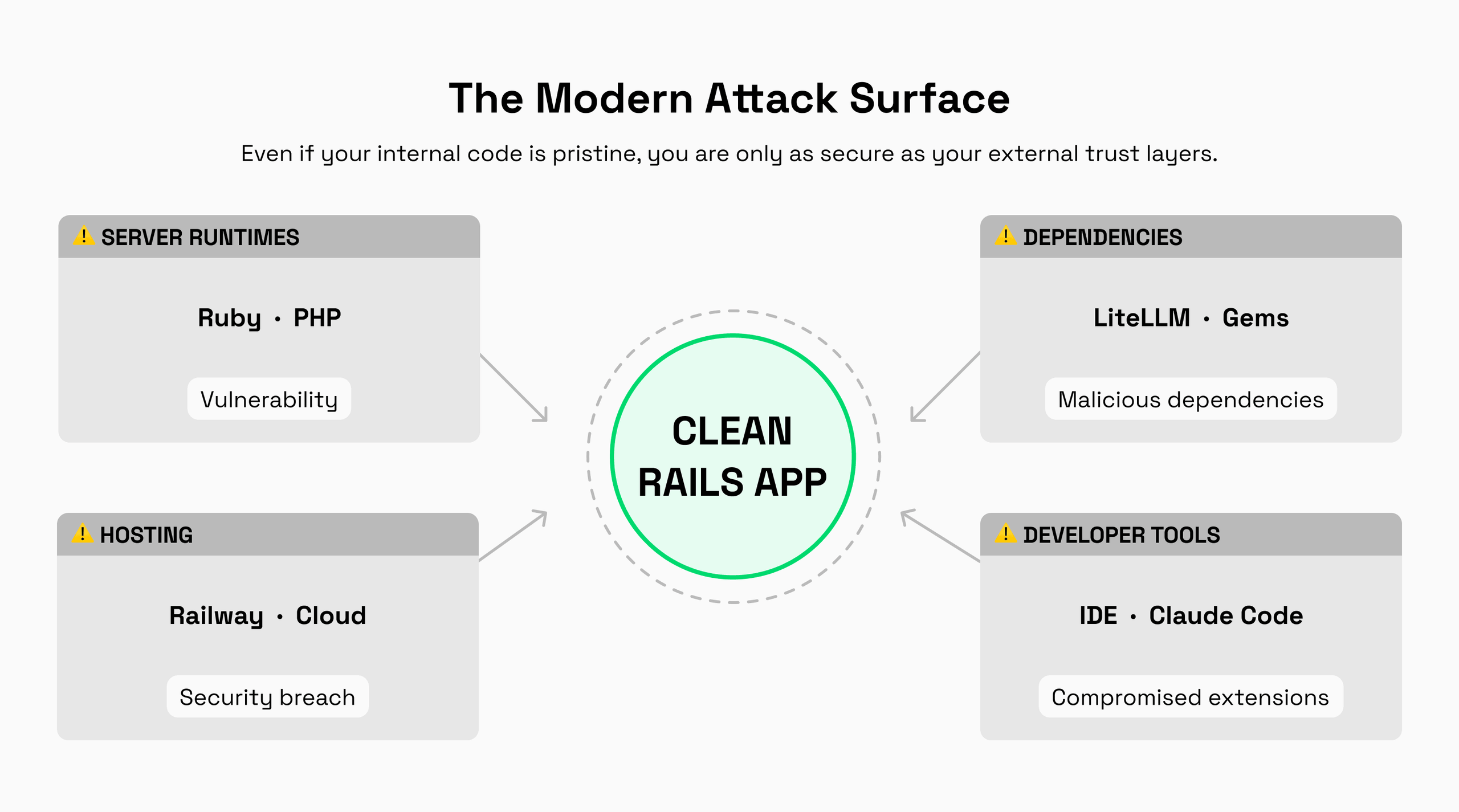
Your app can have clean code and still get hit through what it depends on: a server runtime, a library, a developer extension, or your hosting provider. In October 2026, attackers used all four. A compromise can cause more than a slow site or spam. Depending on the case, it can interrupt sales, expose customer data, or let attackers use stolen credentials.
To protect an app, build security into its architecture and everyday development. That means limited exposure, few dependencies, regular checks, timely patching, and tested deployments.
In a Rails app, it also means locked gem versions, replaceable secrets, limited application and database permissions, and reproducible environments.
Below, we break down six October incidents, share the practices that kept our projects safe, and show how to check your own Rails app. You’ll also learn about a new security feature we shipped in cooperation with RubyGems.org.
Major software security incidents and how they affect your business
October brought emergency patches, poisoned updates, and urgent checks of systems teams normally trusted. Some websites went offline as a precaution. Attack attempts against PHP were reported before patches became available. Elsewhere, routine software updates delivered malware.
There was no single fix. Teams had to establish whether they needed to patch a server, rebuild an environment, check a developer’s computer, or replace stolen credentials.
01. PHP2Shell: the language behind WordPress, Magento and Laravel
The two critical flaws CVE-2026-109618 and CVE-2026-109619 affected PHP, the language used by almost 70% of websites whose server-side language is known. PHP powers WordPress, Magento, Drupal, Joomla, Laravel, and Symfony, putting widely used platforms at risk.
Why it is dangerous
An attacker can run code on an unpatched server without logging in, so passwords won’t stop the attack. Amazon’s threat intelligence team saw attack attempts before the patch was released. Updating WordPress or Magento won’t fix the flaw in PHP itself. Only a PHP update fully fixes it while configuration workarounds leave gaps. Cloudflare added protection rules, but they don’t fix the flaw.
The risk for business
- If you run an online store on Magento or WooCommerce, attackers could steal customer and order data or modify your checkout to capture payment details.
- Your WordPress, Drupal, or Joomla website could be defaced or used to spread malware to visitors. Attackers could also take over admin accounts.
- Official releases with the fix cover PHP 8.2 through 8.5. For PHP 7.4, 8.0 and 8.1. The PHP project published only source patches, and some Linux distributions ship patched packages. Check with your host, and plan an upgrade.
02. Node2Shell: a compressed request could compromise your backend
Node2Shell (CVE-2026-111497) affects Brotli, a compression library that Node.js bundles to unpack Brotli-compressed data. The vulnerable library also appears in other software, so the exposure extends beyond Node.js apps.
Why it is dangerous
If your app unpacks malicious Brotli-compressed data from requests or external services, an attacker could crash it, expose sensitive information, or potentially run code on your server. Updating Node.js alone may not be enough. Affected container images also need to be rebuilt and redeployed with patched dependencies.
Rails apps that use Node.js for asset builds or run Node services next to Rails should check too.
The risk for business
- If your store or SaaS relies on a Node.js backend, an attack could interrupt checkout, customer access, or other core services.
- Your APIs and integrations could become entry points if they unpack compressed data from customers, partners, or external services.
- If attackers achieve code execution, they could access application data and credentials within the compromised process’s permissions.
03. Ruby regex flaws: risks for GitLab and Rails applications
Two critical GitLab vulnerabilities, CVE-2026-97229 and CVE-2026-110264, were traced to bugs in Onigmo, the regular expression (regex) engine inside Ruby. A crafted pattern could let an attacker run code on a server without an account, and one flaw was exploited in real attacks. Ruby on Rails applications may also be affected if they let users supply their own regex patterns, for example, for searches or filters.
Why it is dangerous
The flaw is in Ruby itself, so updating Rails alone will not fix it. Regex timeouts and length limits do not reliably stop it. Self-managed GitLab needs the GitLab update, and any Ruby interpreter you installed separately needs patching as well.
Rails apps need a patched Ruby (4.0.9, 3.4.12, 3.3.13 or later), and user input must never be used as a regex pattern.
The risk for business
- If your team stores proprietary code in self-managed GitLab, attackers could steal it or alter repositories.
- Your release pipeline could deliver malicious changes to production or customers.
- A Rails app that accepts user-defined patterns could expose customer data and credentials, putting connected services at risk.
04. LiteLLM: an AI dependency update that stole credentials
Attackers compromised the release process of LiteLLM, a popular library that connects applications to AI providers, and published a malicious version 1.107.0. It reached PyPI and official container images, so a routine dependency update became a credential-theft attack.
Why it is dangerous
The malware could run when Python started in an affected environment, even if the app never imported LiteLLM. It went after cloud credentials, private keys, AI provider keys and browser data, and it could load more malicious code. It also left files behind, so removing or upgrading LiteLLM is not enough. Affected environments need to be rebuilt and exposed credentials replaced.
The risk for business
- If your product uses LiteLLM, stolen provider keys could let attackers generate AI usage at your expense.
- Your developers’ computers and build agents could also be affected, exposing credentials beyond those used by the AI feature itself.
- For teams running LiteLLM in the cloud, stolen credentials could open access to data and infrastructure within their permissions.
When teams adopt AI tools across the software development lifecycle, extensions, dependencies, and generated code need the same verification and human review as any production change.
05. Tampered Claude Code extensions: a backdoor risk on developer machines
Tampered versions 2.1.312 and 2.1.313 of the Claude Code extension were distributed through Cursor’s extension marketplace for Windows and macOS. They looked like normal updates but were not built by Anthropic.
Why it is dangerous
The extension tried to install a persistent SSH backdoor, giving attackers a hidden way into the developer’s computer. The access could survive a restart and stay after the extension was removed. Affected machines need to be checked and cleaned, and any exposed credentials replaced.
The risk for business
- If your developers installed an affected update through Cursor, their computers could become an entry point into company systems.
- Source code, client files, and locally stored credentials could be exposed if attackers gained access.
- Your production environment could also be at risk if an affected developer had deployment permissions or cloud credentials.
06. Railway: your hosting provider was breached and your secrets may have been exposed
An attacker breached Railway’s infrastructure and accessed systems storing customer application secrets. Railway estimated that up to 1.85% of workspaces, approximately 100,000, were potentially affected. Although it was a hosting-platform breach rather than a Ruby on Rails vulnerability, Rails applications hosted there could still be exposed.
Why it is dangerous
For a Rails app, environment variables may contain database passwords, API keys, and RAILS_MASTER_KEY. Stolen credentials can remain usable after the hosting provider secures its systems. An exposed Rails master key could also let attackers decrypt application credentials if they obtain the corresponding encrypted credentials file.
The risk for business
- Stolen credentials could expose customer data or generate unauthorized AI charges.
- Payment and cloud keys could give attackers access to connected accounts.
- Replacing exposed secrets could disrupt your application and connected services.
In every case, the weak point was something teams trusted by default: a language runtime, a library, an update, an extension, or a hosting platform. Each needed a different response, from patching and rebuilding to cleaning machines and rotating secrets.
Security checks and timely fixes are part of our Ruby on Rails development services. Here are the practices we use to protect our clients’ applications.
6 app security practices that help protect production systems
Our protection doesn’t rely on one clever trick. It’s a set of everyday habits that make an attack harder to start and quicker to stop. Here are the six that mattered most.
01. Acting immediately, even before a patch exists
When a new threat appears, our engineers check at once whether any of our projects are affected. If the vendor has released a patch, which is an official software fix, we install it. If the fix is not ready yet, we look for another way to block the likely attack route until it is. When the official patch comes out, we install it too.
PHP2Shell is the clearest example. The flaw could give attackers full access to a server. Cloudflare added protection, but we didn’t rely on it alone. We rolled out an urgent PHP security update. For our clients, this means the fix is in place before they have to ask.
02. Limiting exposure with architecture and Cloudflare
Our projects are designed to keep the potential attack surface small. On top of that, Cloudflare works as an outer layer between the application and incoming traffic. Think of it as a security checkpoint at the entrance. It filters out much of the harmful traffic before it reaches the server.
This outer layer buys time, but it doesn’t replace updates. Some attacks never pass through it, and a filter can’t fix a flaw inside the software itself. That is why we updated PHP right away.
03. Keeping dependencies to a minimum
A dependency is a ready-made piece of code from a third party, such as a library for payments or file uploads. Each one saves time, but it is also a door into your application. If its authors are hacked, the problem comes in with it. So we add a dependency only when there is a strong reason. Fewer dependencies mean fewer places for an infection to enter and a product that is easier to control.
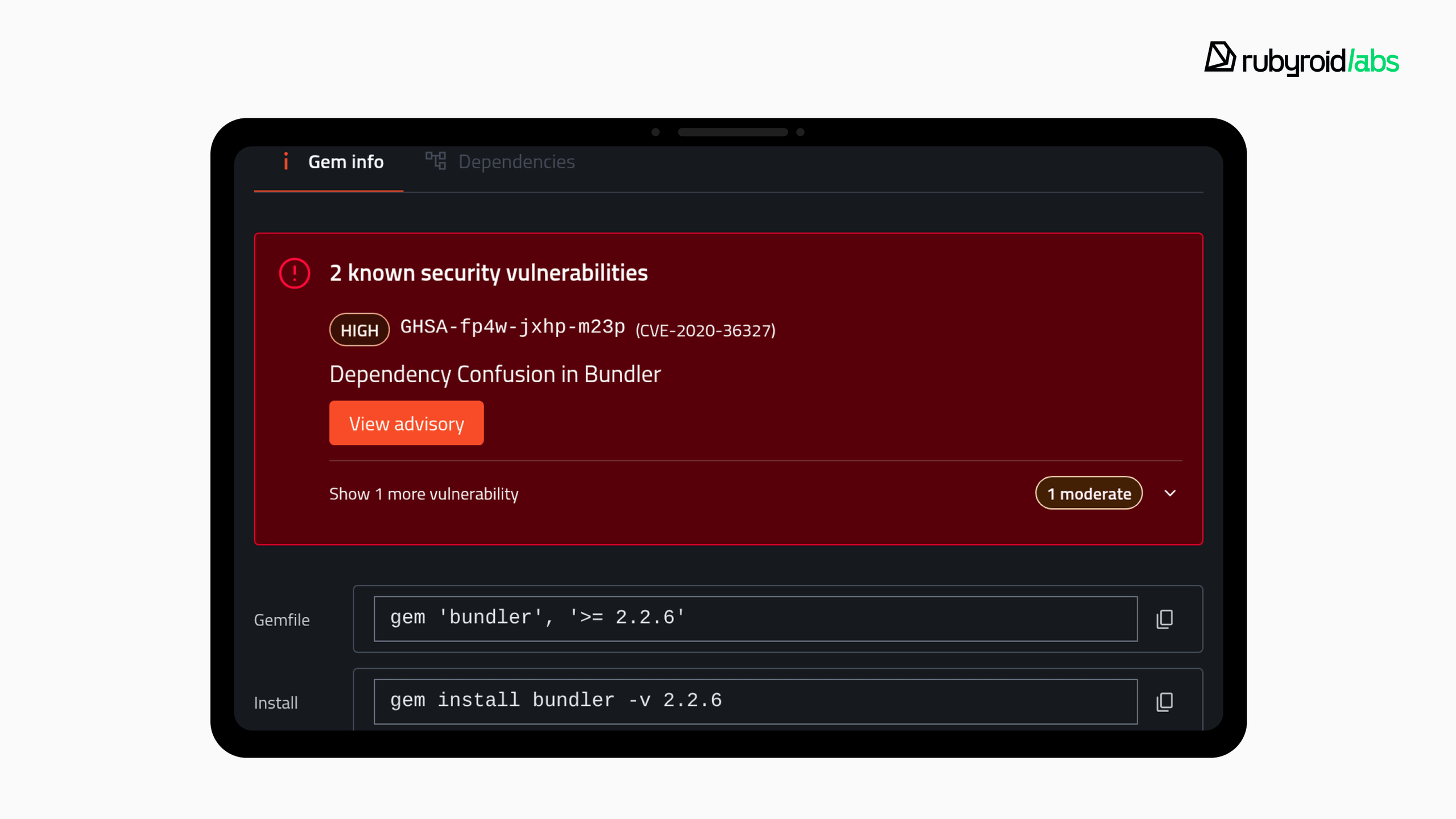
We also care about how the wider Ruby community chooses its dependencies. RubyGems.org is the main public catalog of Ruby libraries, called gems. Until recently, its pages did not warn you if a version had a known security issue, even though that information was public. As a Ruby Central partner and contributor, we wanted that to change.
One of our developers worked with the RubyGems team on a feature that shows security warnings on gem pages. Warnings are marked by severity, and versions reported as malicious are labeled as malware. The data refreshes every hour. For now, the feature works on the website only. Even so, developers can spot a risky library before they add it.
The next step is to bring this data to Bundler and RubyGems, so they can warn about affected versions too.
04. Pinning versions so nothing updates by itself
By default, many tools download the newest version of a library whenever a project is rebuilt. If attackers publish a tampered version, it can get into a product unnoticed. LiteLLM showed how this works: anyone who installed it without a fixed version or pulled a Docker image tagged “latest” could receive the malicious release.
We prevent this by locking exact versions in lock files (Gemfile.lock, package-lock.json) and pinning Docker images by digest. A pinned version changes only after our developers review it. Pinning doesn’t mean freezing: we also update pinned versions before they reach end of life (EOL), when security patches stop.
A version number alone is not always enough. In October, attackers broke into the OVHcloud command-line tool and replaced files inside existing releases, so the version numbers looked the same. A checksum, a digital fingerprint of a file, catches this because it changes when the file does. Lock files and Docker image digests can store these fingerprints for you.
05. Combining trusted scanners with human review
We use security scanners that the Ruby community already trusts, such as Brakeman. It reads the application’s code and flags patterns known to be risky, much like spell-check for security. But a scanner is not the final word. Our developers also review suspicious places by hand, especially new code and changes to dependencies, so we only introduce a new dependency when there’s a compelling reason.
We apply the same approach across our broader workflow, combining Rails code quality and security tools with senior code review so automated checks support human judgment rather than replacing it.
06. Deploying fixes fast, with or without automation
Finding a vulnerability is only half the job. The fix also has to reach the live product quickly and without breaking anything. We use CI/CD pipelines, Docker, Terraform and automated tests to make this routine:
- CI/CD is an automatic assembly line that tests and delivers each change.
- Docker packages the application so it runs the same way everywhere.
- Terraform describes the server setup as code, so it can be rebuilt quickly and without errors.
- Automated tests confirm that the fix didn’t break anything.
For example, after taking over Done Desk’s dental operations platform, we stabilized the codebase and put repeatable release workflows in place first, so updates and architectural refactoring could reach production safely without disrupting daily clinic operations.
Automation can fail as well, because the services behind it sometimes go down. So we always keep an alternative way to deploy. During an active attack, there is no time to wait for a service to come back.
None of our projects were affected. We still treat security as ongoing work, because attackers now move faster, and it has to be part of everyday engineering.
How to check if your Rails app is vulnerable
You don’t need to audit every line of code at once. Start by asking your engineering team a few direct questions to surface immediate exposure, then tackle fixes in order of business risk.
4 questions to send your tech lead today
If you don’t have hands-on access to the repository, paste these four questions into your team’s Slack channel or bring them to your next engineering sync:
- “Which exact Ruby, Node, and PHP versions are running in our production containers right now? Are any of them out of support, and when does support end for the rest?”
- “Are we pinning exact versions in
Gemfile.lock,package-lock.json, and Dockerfiles, or pullinglatesttags on build?” - “If an environment key in Railway or AWS leaked today, do we know who owns access to each service, and how quickly could we rotate the key without downtime?”
- “When did we last run
bundler-audit,Brakeman, andGitleaksand who owns fixing what they find?”
What to check first: a priority order for your team
| Priority | What to check first | How to verify | Typical fix time |
| 01. Today Stop active exposure | Exposed environment secrets (e.g., Railway, AWS, Stripe, AI keys), compromised IDE extensions (Cursor/Claude Code), and unpinned AI libraries (LiteLLM) | Rotate high-risk keys; run Gitleaks on your git history; check developer machines for tampered extensions | 3–8 hours |
| 02. This week Close known runtime & gem holes | Out-of-support Ruby, Rails, Node, or PHP versions and gems with known security advisories | Check the Rails version in Gemfile.lock and the Ruby version in .ruby-version or the Gemfile; run bundler-audit and Brakeman; check gem pages on RubyGems.org | 1–3 days |
| 03. This month Prevent the next emergency | Unowned updates, missing automated tests, and risky manual deployments | Assign a clear update owner; pin exact versions in project files; add automated security checks to CI/CD | 1–2 weeks |
In 13+ years and 230+ projects, the biggest gap we see is that nobody owns updates.
Over time, small delays add up to outdated gems, an unsupported Rails version, and a team that is afraid to touch the code. If your project is in this state, a Rails code audit shows what to fix first, and if your team lacks the bandwidth to stay on top of patching, hiring Ruby on Rails developers gives maintenance a clear owner.
Rails code audit and modernization
If you want to check the app yourself first, use our open-source Rails audit skill. An AI agent such as Claude Code or Cursor runs trusted tools (Brakeman, bundler-audit, Gitleaks, RubyCritic, Debride) and produces a report with prioritized findings and a 0-10 score.
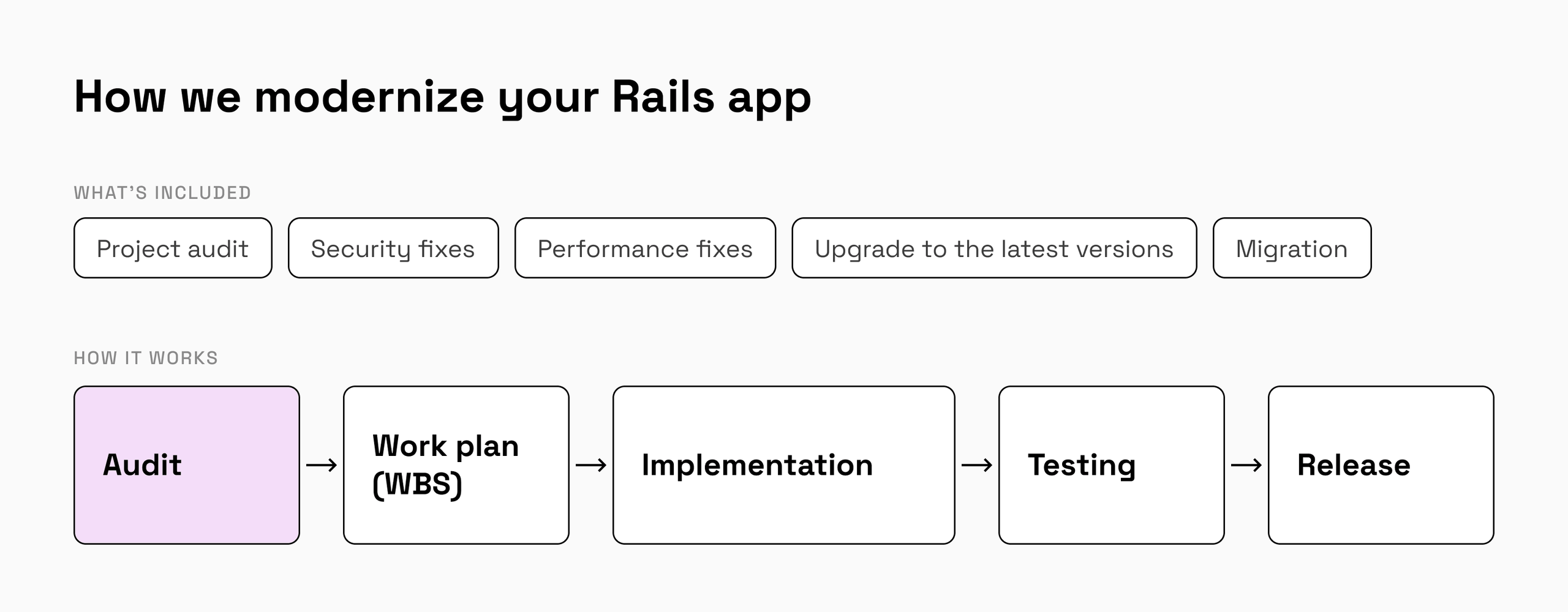
When your team lacks Rails expertise, the app has tricky parts, or the upgrade is too big to handle in-house, our senior Rails engineers can take it from there. We run the audit, fix the issues, and test the result. AI handles the routine: running the tools, analyzing their output, and adapting code to new versions. Our developers review and approve every change.
If your app was inherited from another team, learn how we take over existing Ruby on Rails applications. Once the issue is fixed, our post-launch support can handle monitoring and patching to prevent a repeat.
Security starts before the next attack
October showed that an app is only as safe as the things it trusts, and no single fix covers them all. Start by understanding your exposure, give updates a clear owner, and make sure fixes can reach production safely. Regular checks matter, but only if someone acts on what they find. Gem pages on RubyGems.org now flag known vulnerabilities, which makes the first check easier.
If you want experienced engineers to handle the rest, our senior Rails team can find the weak spots, fix them, and keep your app patched.
FAQ
Why are cyberattacks on web apps increasing?
Cyberattacks on web apps are increasing for three reasons. Attackers target what teams trust by default, such as packages, updates, and hosting, because one compromise reaches thousands of apps. Many flaws are attacked almost at once: according to VulnCheck’s 1H 2026 State of Exploitation report, nearly one in four known exploited vulnerabilities (23.43%) was exploited on or before the day it became public. And teams find issues faster than they fix them, so known flaws stay open longer. Many breaches still start with basic, preventable gaps, such as unpatched software and exposed credentials.
Does updating Rails fix vulnerabilities in Ruby or gems?
Not necessarily. A Ruby vulnerability requires a patched Ruby version, while a vulnerable gem needs its own fix or replacement. If your application runs in containers, rebuild and redeploy affected images so production actually uses the patched software.
Is updating a compromised dependency enough?
Not always. If malicious code ran, updating or removing the dependency may leave stolen credentials or persistent access behind. Investigate affected systems, rebuild compromised environments where necessary, and revoke or rotate exposed credentials.
How often should you audit a Ruby on Rails application for security vulnerabilities?
Run automated security checks on every pull request and schedule regular dependency scans, even when the code hasn’t changed. As a practical starting point, do a broader security review quarterly, adjusting the frequency to your app’s risk. Review sooner after major changes, a suspected compromise, or a new advisory affecting your stack. Don’t wait for the next scheduled audit to address a critical vulnerability.
What tools can help detect vulnerabilities in Ruby on Rails applications?
Each tool covers a different gap:
- Brakeman scans your code for risky patterns.
- bundler-audit checks Gemfile.lock against known gem advisories.
- Gitleaks looks for exposed secrets in your git history.
- RubyCritic and Debride flag code quality problems and dead code that make an app harder to maintain.
- RubyGems.org now shows security warnings on gem pages, so you can check a gem before adding it. For now this works on the website only, so bundle install does not warn you yet.
Tools find issues, but engineers still need to confirm the exposure and decide what to fix first. For code quality tools we use in production projects, see our guide to Rails code quality tools.