React Native mobile app security: best practices for 2026–2028

Mobile security is no longer just an IT issue. It’s a direct threat to revenue, compliance, and your legal standing. In regulated industries like fintech, healthcare or insurance, a single data leak can trigger crippling fines, mandatory audits, and a catastrophic loss of trust that threatens your very right to operate.
The business impact is measurable. According to Guardsquare’s survey of 1,360 mobile leaders:
- 72% experienced mobile security incidents in 2025.
- 65% reported customer churn or app uninstalls as a result.
These outcomes usually follow predictable paths: stolen credentials, hijacked sessions, direct API abuse, risky third-party SDKs, sensitive data leakage, and AI-powered scams that scale fast and look really convincing.
This guide maps out the modern mobile threat landscape, including the rise of AI-powered attacks. You’ll learn the strategic security baseline we implement to protect high-value React Native applications, with examples from our recent fintech project.
Do you know which of these paths is most likely in your app today?
What mobile app security covers in 2026-2028
If your app brings business results, your APIs are already being tested by bots and opportunistic attackers. The easiest vulnerabilities happen when teams don’t agree on who owns what.
At a baseline, mobile app security is split across three boundaries:
- The app (owned by mobile engineering): Guides the user experience, handles session tokens, and protects local on-device data. (Important: Your mobile team must treat the app as an interface, not a reliable security gate).
- The backend (owned by platform/backend engineering): The ultimate authority. This team is responsible for enforcing the rules, validating sessions, authorizing actions, and rejecting suspicious behavior.
- Third-party SDKs (owned by tech leadership & compliance): The external code running inside your app. Because these expand your attack surface, your technical leads must enforce strict data-sharing boundaries before any vendor integration.
When everything is aligned, this triad keeps users safe. But when you build with React Native, securing these boundaries gets more complicated.
Why React Native needs a specific approach
React Native gives teams one shared codebase that runs across two fundamentally different native platforms: iOS and Android.
In 2026, most production React Native apps also rely on a modern stack such as Hermes, the New Architecture (TurboModules + Fabric), and often Expo SDK / EAS, which increases performance and developer velocity and adds more moving parts across the runtime, native bridges, and build pipeline.
In our experience, when security breaks in a React Native app, it happens because something slips in the gaps between architecture layers:
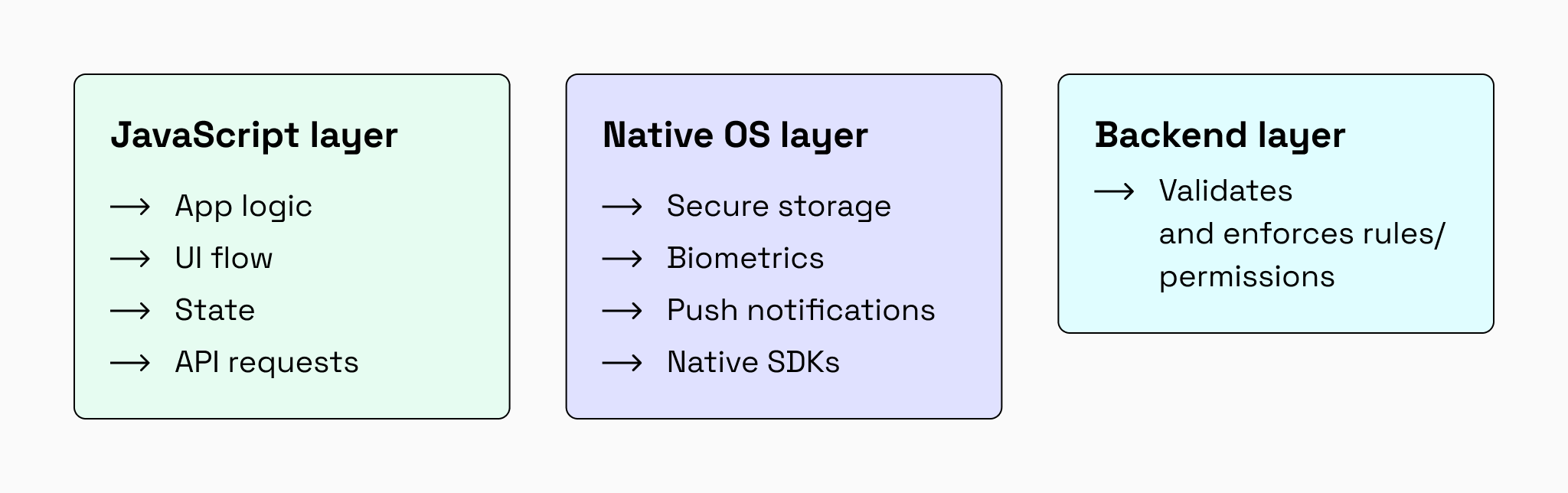
React Native can be harder to secure than fully native apps for a few practical reasons:
- More boundaries to keep consistent: logic lives in JavaScript, but security-critical features (secure storage, biometrics, device attestation, deep links) live natively. Small inconsistencies become vulnerabilities.
- Platform drift is easy: a control can behave safely on iOS while failing silently on Android because of different OS behaviors, permissions, or SDK implementations.
- The bridge is an attack surface: integrating native modules and third‑party SDKs expands the surface area where insecure defaults, misconfigurations, or unexpected data flows can appear.
- Release pipelines are part of security: with Expo/EAS and CI/CD environments, configuration mistakes (debug flags, logging, test tokens, wrong build profiles) can ship to production if not gated.
Vulnerabilities emerge when these layers fall out of sync. For example, a developer might bypass the shared JS API client on a single screen, a debug token might get bundled into a production build, or an SDK might behave securely on iOS but leak data on Android.
To secure a React Native app, you can’t treat the app, backend, and release pipeline as separate concerns. You have to align JavaScript logic, native bridges, and CI/CD into one unified defense.
Common mobile app security threats
Cybercriminals win by scaling cost-effective attacks rather than burning complex zero-day exploits. According to Verizon’s 2026 Data Breach Investigations Report (DBIR), recurring patterns like credential theft, mobile social engineering, vulnerability exploitation, and supply-chain compromise dominate because they remain cheap and reliable to execute at volume.
This threat landscape isn’t isolated to a single niche. The same exposure spans every major sector, including technology, retail, financial services, healthcare, telecommunications, and government.
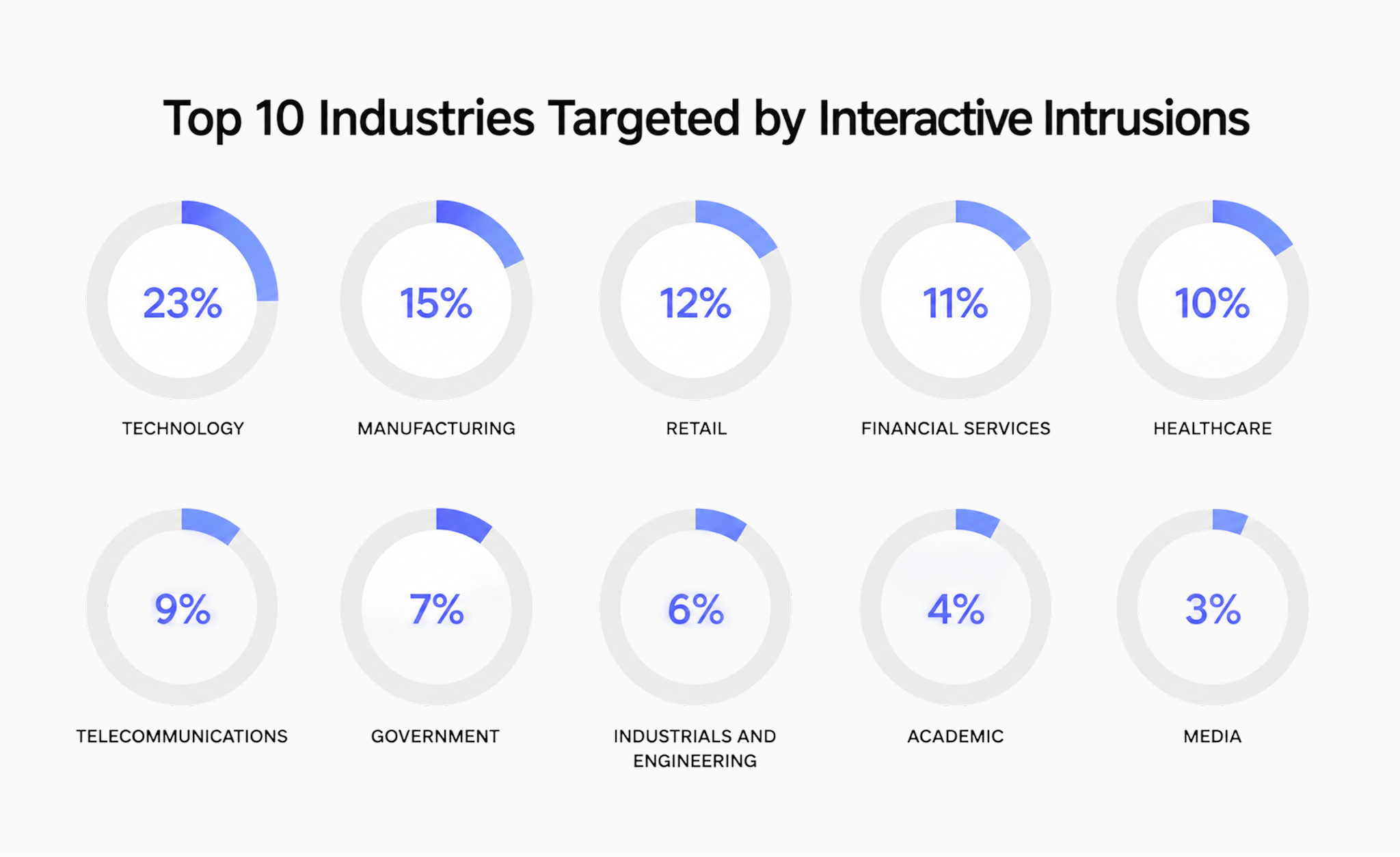
Regardless of whether an app is built natively or cross-platform, attackers target the same structural weaknesses. Here are the attack paths mobile engineering teams most often underestimate in production:
API abuse & automated scripts
Attackers realize they don’t need to hack your app. They just inspect your network traffic and write scripts to call your backend directly, bypassing client-side validation entirely.
Business impact: Attackers can bypass the app and call your backend directly, leading to unauthorized actions (fraud), higher server costs, and frustrated users who churn.
Fake or modified clients
Bad actors download your APK/IPA, strip out the security checks, and run modified versions on emulators to probe your system at scale.
Business impact: If someone can run a modified app, they can skip client-side restrictions, abuse paid features, and probe your system until something breaks.
Account takeover (ATO)
Attackers utilize credential stuffing, SIM-swapping, or phishing to hijack legitimate user accounts.
Business impact: When your accounts are taken over, you deal with stolen balances/orders, refunds and chargebacks, and a spike in support tickets.
Silent data leakage
Leaving plaintext secrets, auth tokens, or PII in places developers forget to check, such as local storage like standard AsyncStorage, production logs, clipboard caches, and crash reports.
Business impact: If tokens or PII leak from storage/logs/crash reports, you risk regulatory trouble, legal exposure, and a trust hit that’s hard to repair.
Supply chain & SDK risk
Integrating third-party libraries (analytics, messaging, UI tools) that over-collect permissions or introduce vulnerabilities without your team realizing it.
Business impact: A risky SDK or dependency can quietly introduce a vulnerability or leak data, creating incidents even if your own code didn’t change.
AI-powered threats & AI-generated code risks
In 2026, attackers use LLMs to automate API probing and scale phishing. But an equally dangerous threat comes from inside your own codebase: vibe-coded, AI-generated applications.
As we highlighted in our guide to AI-generated React Native app stabilization, LLMs optimize for “happy path” features while skipping defensive engineering, leaving behind weak token validation, missing rate limits, or swallowed exceptions.
Worse, AI models frequently hallucinate non-existent packages. Attackers register these fake names on public registries with malicious payloads, a modern supply-chain attack known as slopsquatting.
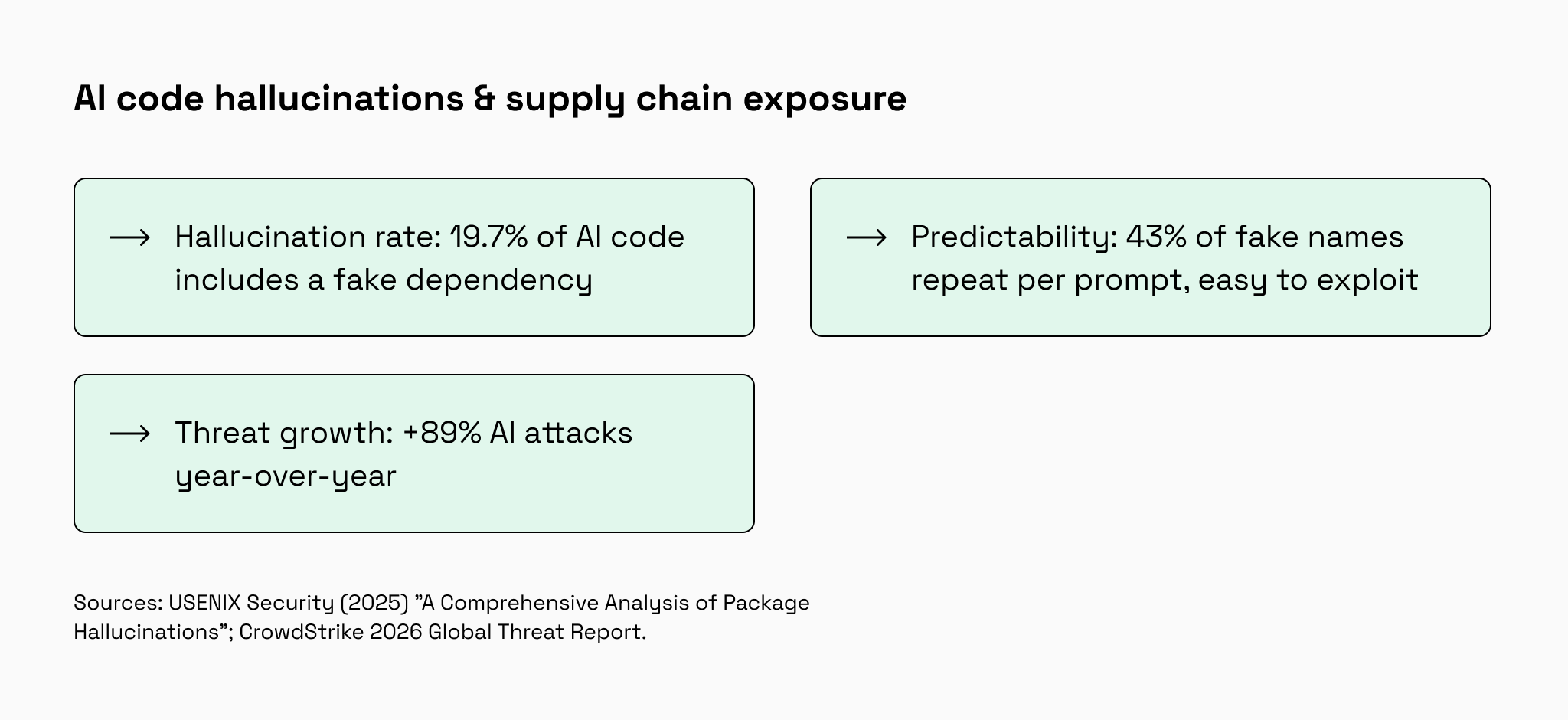
The risk: Blindly accepting AI-generated code can inject malware directly into your CI/CD pipeline or production environment.
The defense: Enforce strict dependency auditing (SCA tools), senior engineering code reviews, and a mandatory stabilization phase before pushing AI-built features to production.
If you are preparing to scale an AI-built MVP or simply want peace of mind regarding a vibe-coded codebase, a dedicated architectural review is essential. Our team frequently performs full code audits and security reviews to help founders catch vulnerabilities early and safely prepare their applications for production.
Security practices we apply in React Native mobile apps
Understanding threats in theory is one thing; defending against them in a live commercial app is where execution matters.
At Rubyroid Labs, we know that high-profile security failures rarely come from complex zero-day hacks. They usually stem from small operational oversights, like saving sensitive user data in unencrypted storage or letting a developer bypass backend checks on a new feature.
When building Kasheesh, a fintech platform allowing users to split single payments across multiple cards, our primary goal was protecting high-value financial transactions without ruining the user experience.
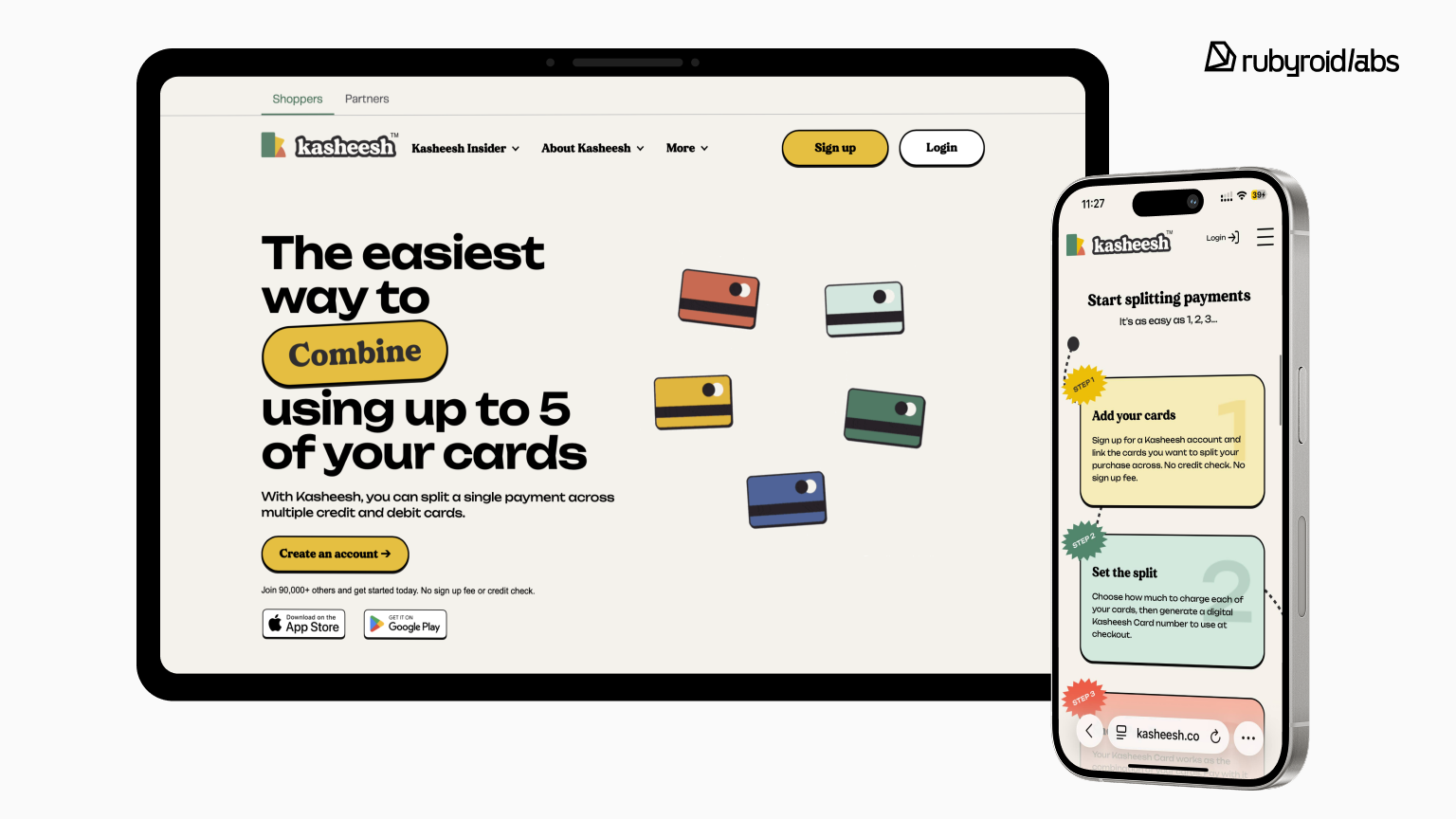
Here is the strategic security framework we implemented to protect both the product and the business.
01. Minimize liability: never touch raw sensitive data directly
Storing credit card numbers, Social Security numbers, or bank credentials drastically increases your legal liability, compliance overhead (such as PCI-DSS), and data breach risk.
Our approach:
We structured Kasheesh to work exclusively with secure third-party tokens instead of raw data. We integrated specialist platforms at the edge:
- VGS for SSNs
- Plaid for bank authentication
- Stripe for payment processing
- Marqeta for card display
Raw SSNs, bank login credentials, and card numbers are tokenized at the edge (VGS, Plaid, Stripe, Marqeta). Our systems work with tokens/aliases, not those raw secrets.
02. Enforce security on the server, not just the screen
A mobile app interface can be tampered with or bypassed by an attacker using automated scripts. Treating client-side screens as your primary security boundary exposes your platform to unauthorized transactions and account takeover.
Our approach:
The React Native app UI strictly serves user experience, while our backend acts as the unyielding vault door. Authenticated API calls are validated server-side on every request. For instance, if an account is flagged as frozen, the backend blocks write actions automatically even if a modified app client tries to force a transaction through.
03. Implement end-to-end Multi-Factor Authentication (MFA)
Relying on passwords alone is a massive risk for account takeovers, especially in fintech. However, MFA is only effective if it’s deeply integrated into both the client flow and backend rules.
Our approach:
In Kasheesh, MFA isn’t just a checkbox in the settings. We built an end-to-end SMS MFA flow covering both sign-in and initial enrollment, showing a blocking screen until the user configures their second factor. Crucially, this is enforced on the server. The backend actively verifies Firebase claims on every request. If a session lacks the second factor (mfa_required) or is revoked (token_revoked), the server rejects it with a 401 error. Our unified React Native API client catches this universally, preventing the app from hanging and immediately forcing a secure user logout.
04. Block bots, scripts, and fake apps at the door
Automated scripts and emulators can overwhelm your APIs, scrape proprietary data, or run credential-stuffing attacks to hijack legitimate accounts.
Our approach:
To raise the bar against scripted clients and modified app builds, we use Firebase App Check with Google Play Integrity on Android and Apple App Attest on iOS. Critical authentication flows require a valid App Check token, and the backend validates Firebase session tokens server-side. This doesn’t replace API authorization but it makes it much harder to pretend to be our production app.
05. Lock down on-device storage to prevent data leaks
Stolen or lost mobile devices running your app shouldn’t become a doorway for hackers to extract active login tokens or user secrets.
Our approach:
We restrict standard local storage (AsyncStorage) to non-sensitive UI preferences, such as onboarding flags. Authentication session handling goes through the Firebase Auth SDK, which relies on the device’s secure storage (iOS Keychain / Android Keystore). We also keep an expo-secure-store adapter ready for any sensitive values that must persist on-device.
06. Eliminate human error with centralized security rules
As engineering teams grow, security vulnerabilities frequently creep in when individual developers write custom code for new screens and forget crucial security headers or session checks.
Our approach:
We centralized all authentication, session lifecycle management, and network security policies into shared internal packages (@kasheesh/api and @kasheesh/auth). Because every app feature uses this unified client, security rules are applied consistently across both iOS and Android automatically.
07. Protect brand identity and data in transit
Phishing campaigns using fake links can deceive your users into handing over credentials, while unsecured connections expose data to interception on public Wi-Fi networks.
Our approach:
We set up Verified App Links (Apple Associated Domains and Android autoVerify) to reduce deep-link hijacking/spoofing and ensure official domain links open in our verified app when possible, otherwise falling back to the browser. Additionally, we enforce HTTPS so data isn’t sent in plaintext over the network.
08. Secure the supply chain from code to app store
Internal credential leaks or unvetted code updates can corrupt your production application before it ever hits the App Store or Google Play.
Our approach:
We keep production API keys and credentials entirely out of source code repositories, injecting them securely during automated builds via EAS environments. Furthermore, every code contribution must pass automated testing gates (unit tests, type checks, and end-to-end smoke tests) before receiving senior engineering approval for release.
Additional security layers for React Native mobile apps
The practices above reflect the security approach we used for this particular fintech case study: reducing raw data exposure, enforcing access on the backend, verifying app requests, centralizing security logic, and controlling releases.
Depending on the product, risk model, compliance requirements, and threat landscape, we may also recommend additional layers:
- Passkeys are useful when the product wants to reduce password dependency and support stronger, phishing-resistant login.
- RASP detects runtime threats such as tampering, hooking, debugging, or code injection.
- Jailbreak and root detection helps identify compromised devices and restrict sensitive actions when needed.
- Certificate pinning adds protection against certain man-in-the-middle attacks on API traffic.
- Dependency scanning, SAST, and SCA catch vulnerable packages, insecure code patterns, and supply-chain risks earlier.
- Penetration testing validates the mobile app, backend, APIs, and critical user flows before major releases.
The right setup depends on the sensitivity of the data, the value of the actions users can perform, regulatory expectations, and the level of risk the business is willing to accept.
Conclusion: next steps to improve mobile app security
Mobile security gets messy when it’s treated as a generic checklist. The scalable approach is simpler: define what the app can guide, what the backend must enforce, and what third‑party SDKs are allowed to access.
If you want to reduce risk fast, use this rollout:
- Do first: Limit your blast radius. Tokenize sensitive data and make sure secrets never land in plaintext in logs, crash reports, or AsyncStorage.
- Do next: Move authorization to the backend. Validate sessions server-side and add rate limits to stop automated API abuse.
- Keep doing: Audit SDKs and lock down your CI/CD pipeline (dependencies, secrets, build profiles, release gates).
If you’re not sure where you stand today, we offer two review formats:
- Quick security health check (1–2 days): a fast scan of the highest-risk areas (on-device storage, logging, key auth flows, API trust assumptions, and SDK exposure).
You gain: a short findings list with top risks and “fix first” recommendations. - Full mobile security review (1–2 weeks): a deeper audit of the mobile app, backend touchpoints, and release pipeline, including abuse scenarios (bots, fake clients) and supply-chain controls.
You gain: a prioritized remediation roadmap with concrete recommendations your team can implement.
For US-based teams and regulated products, we can also align findings to common compliance expectations (e.g., privacy/security controls and audit-readiness), so the work supports both engineering and governance.