Engineering high-performance React Native apps: lessons from production

Slow React Native apps are rarely born slow. Performance usually degrades because of small decisions that look harmless: a state shortcut, an untested list, oversized images, limited device testing, or an architecture that makes every product change harder than it should be.
Most performance issues are not dramatic engineering failures. They are early product and architecture decisions that were never checked under real mobile conditions.
This article focuses on those decisions: what breaks, why it breaks, and what an experienced team checks when building truly high-performance React Native apps, before performance becomes a production incident or delivery speed starts slowing the business down.
What high performance means in React Native
Many teams stop at internal metrics: build times, bundle sizes, Lighthouse scores. Useful, yes. But they don’t answer the critical question: can users actually complete a flow when the app is under pressure?
Amplitude surveyed 2,000 UK smartphone users and found that performance failures have immediate business consequences.

The takeaway: users don’t forgive slow or broken apps. Mobile devices are personal, used throughout the day, and when an app fails, trust is gone.
That’s why React Native performance comes down to how fast the app works, not just how it looks. Design matters for trust and brand, but performance decides whether users can finish a task.
If the app opens slowly, taps feel delayed, or checkout freezes, the interface doesn’t get a chance to impress. The four signals that show whether your app is actually usable
| Metric | What it measures | Safe zone | Why it matters | Warning sign |
| App startup time | Time from tapping the app icon to the first useful screen | < 2 seconds cold start | Over 3 seconds, users start leaving before the first interaction | Splash screen hangs, black screen appears, launch feels frozen |
| Time to Interactive (TTI) | Time until the visible screen responds to taps, scrolls, or input | < 1 second after screen appears | Over 2 seconds, the screen looks ready but feels broken | Buttons are visible but taps feel ignored |
| Frame rate | Smoothness of scrolling, gestures, and animations | Sustained 60 FPS | Regular drops below 50 FPS expose technical debt users feel instantly | Lists stutter, swipes lag, animations skip |
| Memory usage | Memory consumed during a real session | Under 150MB for typical flows | Growth above 300MB, or continuous memory creep, can cause silent crashes | App crashes during checkout, scrolling, or onboarding |
At Rubyroid Labs, we’ve seen the same performance patterns while building, debugging, profiling, and stabilizing React Native apps in production. They’re easier to prevent than untangle under pressure if you know where they start.
Where React Native performance issues usually start
React Native performance issues start earlier, in ordinary project decisions that look harmless at the time.
01. Web developers turned into mobile devs overnight
React Native gives React developers familiar ground: JavaScript, components, props, state, hooks. That makes the learning curve shorter.
But mobile has its own rules. Navigation, permissions, app backgrounding, gestures, native crashes, device performance, app store requirements. So, treating React Native as “React with a phone-shaped screen” leads to shaky UX, slow builds, extra QA rounds, and releases that keep slipping.
In fact, you get delayed releases, unstable screens, rework, and a product weaker than the demo.
02. Testing in a perfect bubble
A high-end simulator on a powerful Mac is not your customer’s phone. If testing stays on fresh iPhones, M-chip simulators, and office Wi-Fi, problems hide well. Real users bring older devices, weak networks, and long sessions.
As a result, production becomes QA, and users discover performance issues first.
03. Dependencies pile up
A package for every small feature feels fast in the moment: calendars, animations, charts, masks, analytics, storage, and formatting. Each one looks harmless alone. Together, they bloat the bundle, slow startup, complicate native builds, and make upgrades painful.
That is how a quick shortcut turns into slower launches, harder releases, and expensive maintenance.
04. Choosing React Native for the wrong workload
React Native works well for fintech, e-commerce, marketplaces, booking, delivery, healthcare, SaaS, and internal tools. But real-time 3D, advanced AR, heavy video editing, or massive background processing can turn the project into a long fight with native workarounds.
At that point, the cross-platform advantage shrinks, while development and maintenance get heavier.
This is why choosing a React Native partner should not stop at portfolio slides and “X years of experience.” Ask how the team actually works when performance is at stake.
Ask what devices they test on. How they profile slow screens. How they catch memory issues. What went wrong in past projects and what changed in their process after that.
If you want a deeper vendor-screening checklist, we covered it in our guide to the top React Native development companies in the USA, including the questions that separate real production experience from polished proposal language.
4 React Native performance failures and what they teach
React Native becomes difficult when teams treat it as easier than it is.
The lessons below show failure patterns that help you recognize whether your team is preventing problems or just masking them temporarily.
Failure 01: the app is built like a web app
The problem. Developers treat a mobile screen like a desktop browser viewport. A small, frequent state update, such as typing, polling, or background location updates, triggers render cascades across the screen. A desktop browser may hide this. A phone will not. The result is dropped frames, delayed taps, and an interface that feels stuck.
The lesson. React Native uses familiar React patterns, but it executes code within a strictly constrained mobile environment. State updates must be completely isolated, atomic, and intentional.
Important. Unnecessary re-renders are a common culprit, but they are not the only cause of sluggish UI. Stuttering and frozen scrolling can also come from heavy JS thread work, layout thrashing, or unvirtualized views, even when React DevTools shows no re-render spike.
The fix
- Keep fast-changing state low in the component tree.
- Use local or atomic state, memoized components, stable callbacks, and selectors to avoid render cascades.
- Test on real devices, checking FPS and JS thread activity. If lag remains, look at list virtualization and defer non-critical work.
Failure 02: the list works in QA, crashes in production
The problem. The team tests with clean, limited mock data, and everything works. Then production brings real content: long lists, nested text, heavy media, and messy inputs. Scrolling starts to stutter, or the screen locks up entirely.
The lesson. True production scale is not measured solely by concurrent active users; it is also defined by real-world content volume, asset dimensions, and the runtime memory footprint per rendered screen.
Important. A properly virtualized list usually slows down before it crashes. If it crashes at scale, look beyond “too many rows”: memory pressure, images, leaks, retained screens, row complexity, or image decoding are often the real cause. FlashList helps, but a well-configured FlatList can be enough when the actual bottleneck is handled. Shopify’s benchmarks show FlashList can be 5-10x faster for complex lists, but proper virtualization matters more than the library choice.
The fix
- Swap unoptimized containers for virtualized components like FlatList or Shopify’s @shopify/flash-list to ensure views are recycled rather than constantly stacked in memory.
- Never use index-based keys for mutable, dynamic lists. Always enforce unique, stable string IDs.
- Use pagination, lazy loading, or infinite scroll strategies to batch data retrieval.
Here is one of our own lessons from working with lists. It was not a pleasant discovery, but it made our process sharper: we refined how we test production data, profile memory, and prepare list-heavy screens before release.
Rubyroid Labs use case: the food delivery app menu breakdown
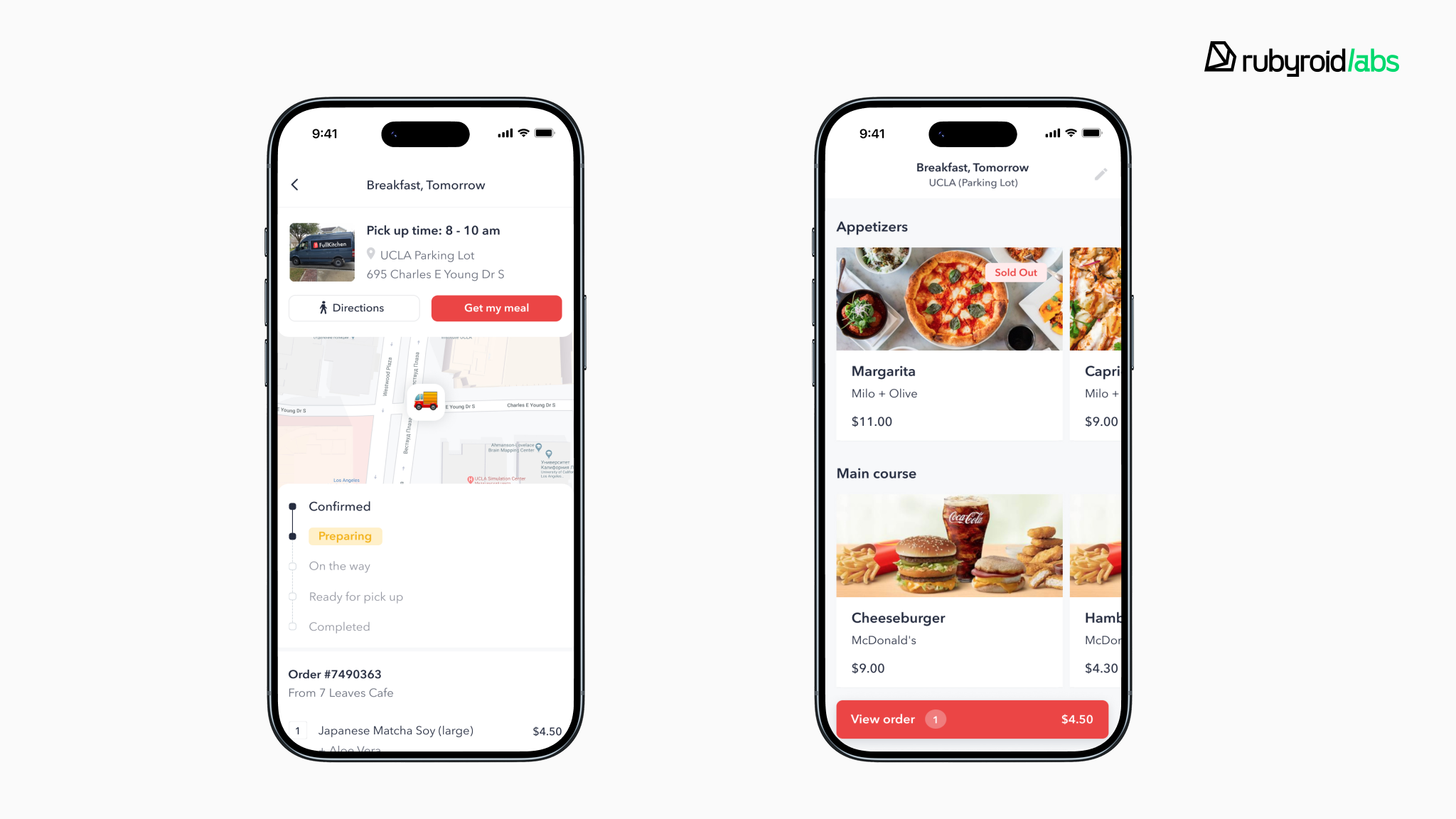
FullKitchen is a US food delivery app that lets users combine dishes from multiple restaurants in one order. We built the MVP in two months with React Native, plus a CRM for restaurant owners to manage menus, orders, ads, and analytics.
Symptoms
After launch, the app started crashing on the menu screen. Users couldn’t browse dishes without the app closing unexpectedly.
Root cause
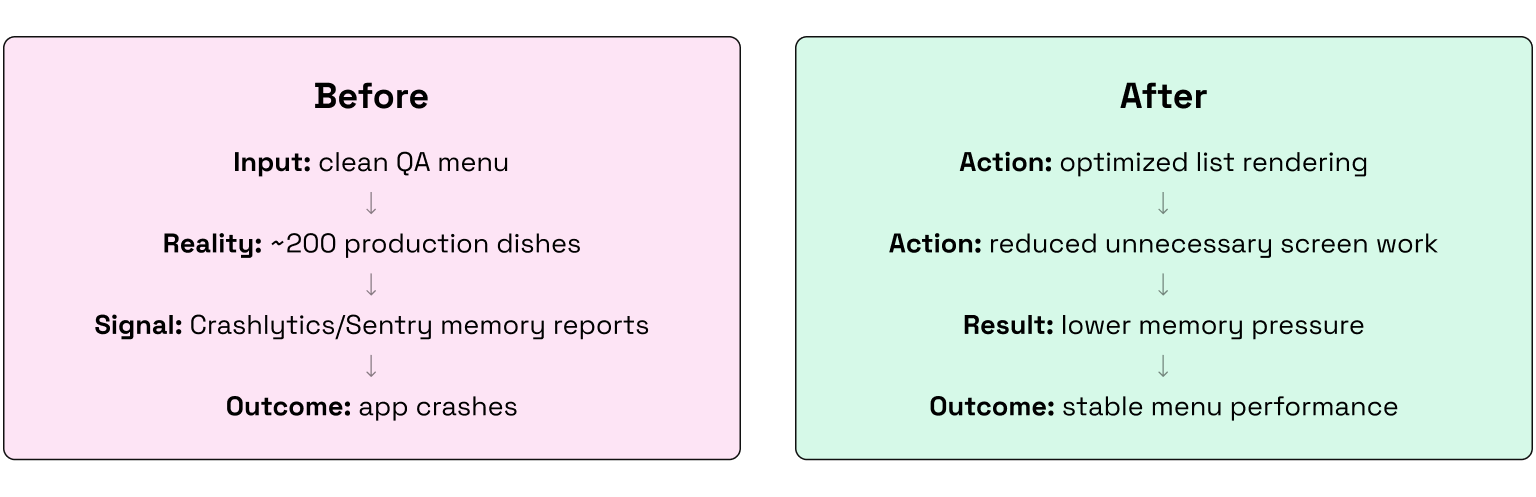
Crashlytics showed memory pressure. QA tested with a small, clean dataset. Production added ~200 dishes with full descriptions, categories, and images. The list rendering wasn’t optimized for that volume, so memory climbed until the OS killed the app.
Solution
We optimized list rendering, eliminated unnecessary updates, and reduced memory-heavy work on the menu screen.
Impact
The app stabilized. Memory stayed within safe limits, and users could scroll through the full menu without crashes.
Failure 03: images and assets become a memory problem
The problem. High-resolution images or raw assets are loaded into lists, cards, or feeds without resizing, compression, or cache limits. Developers may check file size on the server and miss the real issue: decoded bitmap size in RAM. As users scroll, memory climbs until the OS kills the app.
The lesson. On mobile platforms, decoded image bitmaps are often one of the largest hidden memory costs in your application, particularly when embedded within scrollable user interfaces.
The fix
- Resize and compress images before they reach the phone, ideally through the backend or CDN.
- Serve image variants that match the UI slot.
- Never download a 4K source just to show a small thumbnail.
- Use WebP only where your CDN and image library support it reliably.
- Set cache limits and eviction rules, especially for image-heavy lists.
- Test memory on real devices because simulators rarely expose true OOM problems.
Failure 04: the app crashes without a trace
The problem. The app looks stable during a two-minute smoke test. Then a real user keeps it open for 20 minutes, moves through several screens, scrolls, backgrounds it, returns, and the app suddenly disappears. There is no red screen, no JavaScript error log, and no useful stack trace.
The lesson. Not all React Native engineering failures manifest as readable JavaScript exceptions. Out-Of-Memory (OOM) terminations, native watchdog timeouts, and thread deadlocks occur at the native operating system level, masquerading as silent, untraceable application exits.
The fix
- Use Crashlytics/Sentry as the first signal, but remember that silent exits often need native profiling.
- OOM kills, iOS Jetsam events, and watchdog timeouts may leave no useful JS stack trace.
- Run long-session QA, profile memory with Xcode Instruments and Android Profiler, clean up timers, listeners, and subscriptions, and treat screen mounting as a product trade-off, not a default setting.
The architecture layer most teams forget: delivery performance
So far, we have talked about performance users can feel in their hands: frozen screens, slow lists, memory crashes, and broken sessions. But there is another layer, less visible and just as expensive for you: the speed at which the team can safely change the product.
This usually appears after the mobile app is already in decent shape. The runtime is stable, the screens work, and iOS and Android share one React Native codebase, but the product still moves slower than it should.
In one of our fintech projects, the bottleneck was not inside the mobile app anymore. There was a gap between mobile and web.
Case study: unifying web and mobile under one product core
Kasheesh is a US fintech app that lets users split one payment across up to five cards through a digital Kasheesh Card.
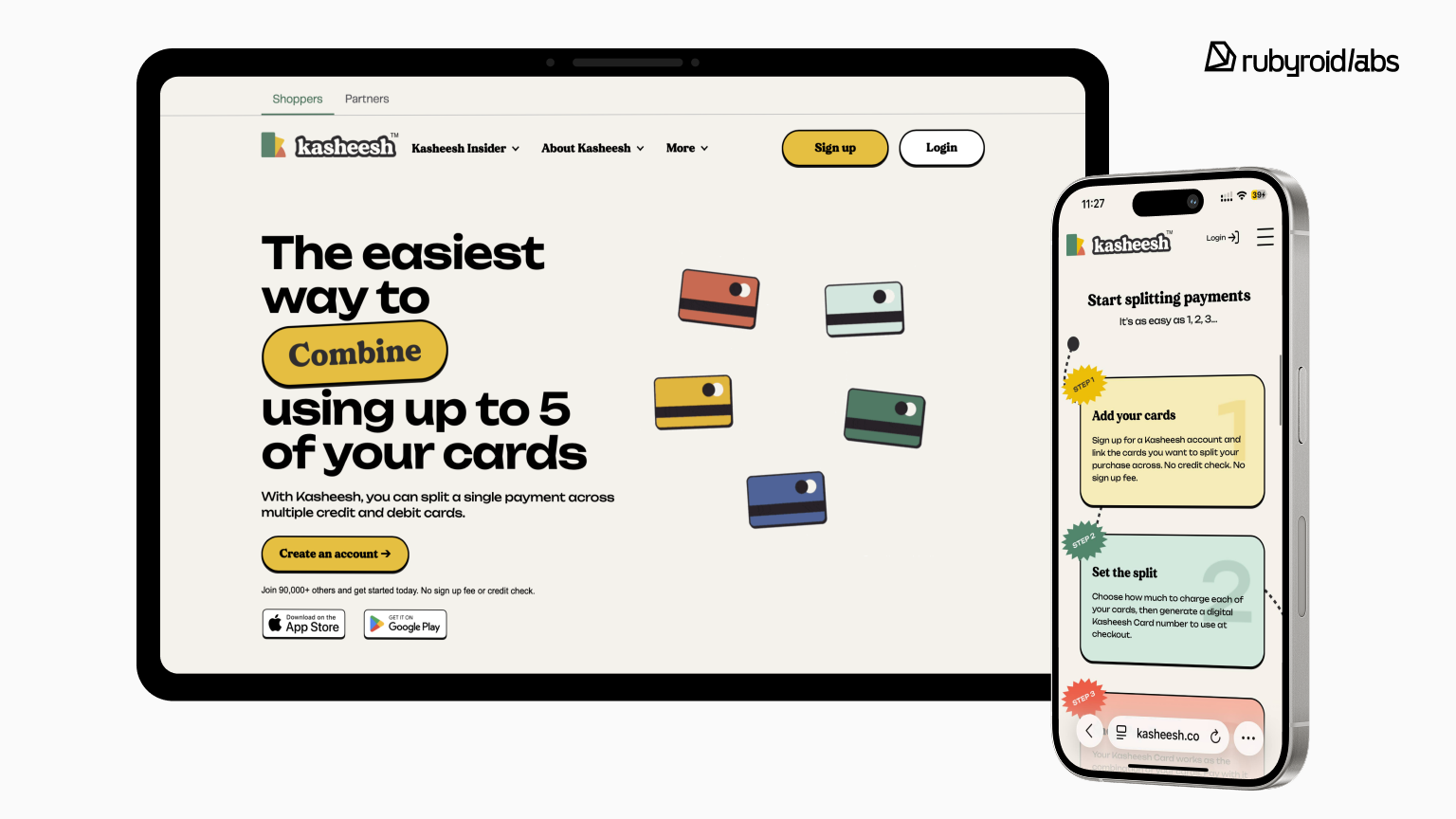
After we migrated the app from Flutter, we got a high-performance React Native app with one shared codebase for iOS and Android. The bottleneck appeared on the web side.
The web app was treated as a separate product layer, so the same business rules, data-fetching logic, and user flows had to be written and maintained twice: once for mobile and once for web.
That slowed down feature delivery and increased the risk that the app and website would behave differently after the same product change.
The strategy: one core, two shells
To remove the delivery drag, we moved to a simple architecture
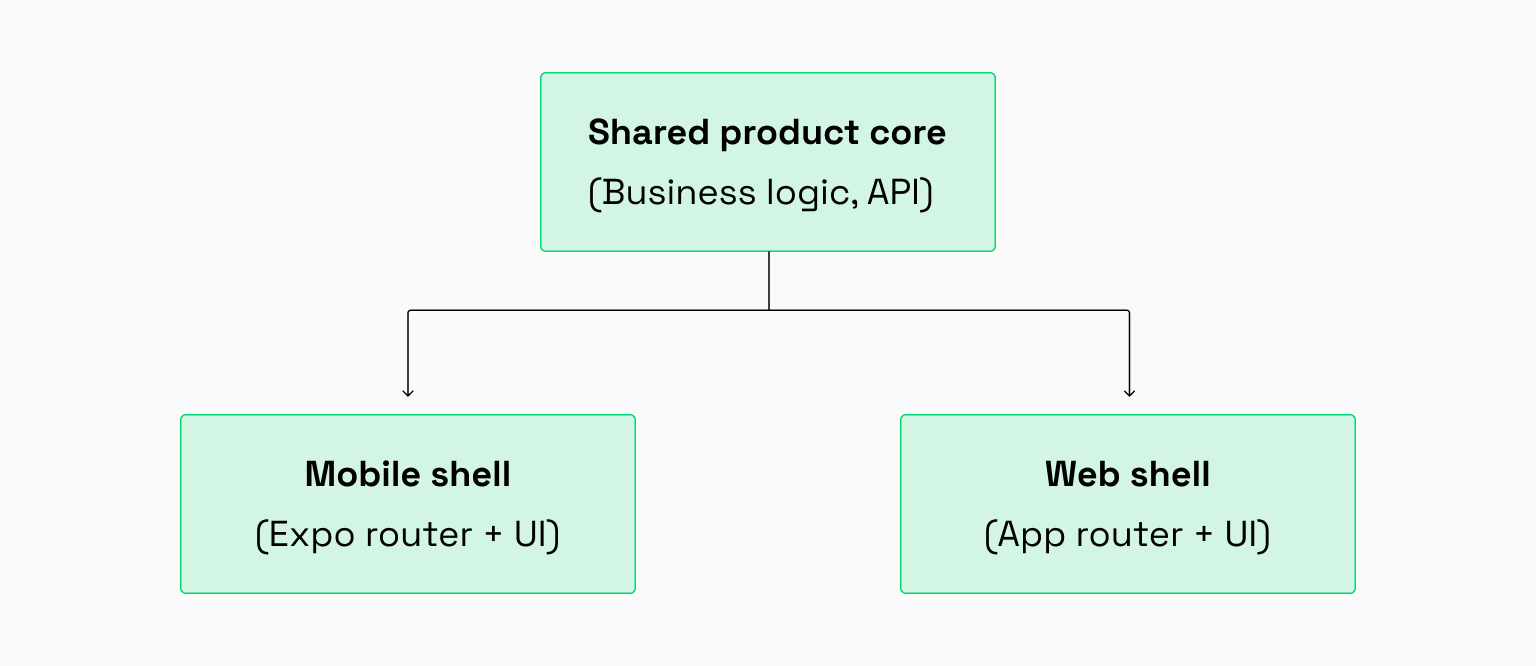
Instead of duplicating logic across mobile and web, we extracted the non-visual parts into shared packages inside a single monorepo managed with pnpm workspaces and Turborepo.
The shared core contained
- business logic
- API contracts
- data-fetching hooks
- reusable utilities
- shared types and validation rules.
The platform shells stayed separate
- Mobile: React Native with Expo Router
- Web: App Router
- platform-specific UI, navigation, and client behavior.
To keep the setup clean as the team grew, we used Feature-Sliced Design (FSD) inside the applications. In plain terms, features could not randomly import from each other. Shared logic had to live in the right layer, not hide inside one screen and quietly spread through the codebase.
The result
With one shared core, the team shipped faster and reduced the risk of inconsistent product behavior
- Reduced development costs: Cross-channel feature engineering dropped from double the effort to roughly 1.5×, securing a 25% to 35% savings on typical cross-platform features.
- Eliminated product divergence: Moving critical domain logic into a single shared packages layer reduced the risk of patching an issue in the mobile application while leaving it broken on the website.
- Accelerated deployment pipelines: By deploying Turborepo with remote caching, our continuous integration pipelines avoided redundant rebuilds, validating pull requests up to 90-95% faster.
| Core business metric | Legacy fragmented model | Unified monorepo core (FSD) |
| Logic cost multiplication | Paid twice (mobile + web separately) | Core built once + two presentation layers |
| Web sync horizon | Extended delay; high divergence risk | Faster deployment on proven core |
| Feature delivery cost | ~2.0× baseline | ~1.5× baseline |
| Pre-release CI verify loop | ~8–10 minutes per pipeline run | ~30–90 seconds on cached cycles |
When engineering for scale, frame rate is only one question. The other is whether the team can change the product quickly without paying twice for the same business rule.
Modern React Native performance stack (2026 Edition)
React Native used to carry a performance stigma, and some of it was earned. The old bridge created real overhead when apps pushed too much data between JavaScript and native code.
The stack is stronger now. Hermes, the New Architecture, Fabric, TurboModules, JSI, Reanimated, optimized lists, and production monitoring give teams far better control over startup time, responsiveness, native communication, and memory behavior.
Still, tools do not make architectural decisions. They only give the team more leverage.
Here is the React Native performance stack we care about in 2026
Hermes
We enable it by default for faster startup and lower memory footprint, but only after verifying the JavaScript bundle stays lean. A bloated bundle under Hermes still launches slowly as the engine can’t fix what shouldn’t be there. Hermes improved startup time by up to 50% in Meta’s tests and reduces memory footprint significantly on Android.
New Architecture (Fabric + TurboModules + JSI)
We adopt it when the app has heavy JavaScript-to-native communication and the dependency ecosystem supports it. It reduces overhead, but migration takes effort. We don’t upgrade just because it’s new, we upgrade when it solves a real bottleneck.
Reanimated
The tool is used for gesture-driven UI and complex animations that need to run independently of the JS thread. If animations can tolerate occasional frame drops, we keep them simpler. Reanimated is powerful, but it’s not always necessary.
FlashList / Optimized FlatList
FlashList helps us when lists are long, complex, and need performance out of the box. For simpler cases, a well-configured FlatList is enough. The real work is in row optimization, stable keys, and memory management, not just swapping list implementations.
Observability (Sentry, Crashlytics, Firebase Performance, Datadog)
We treat production monitoring as non-negotiable. Crash reports, ANRs, memory spikes, and slow screens need to surface before users report them. If we’re debugging based on support tickets, our observability setup failed.
OTA Updates
OTA updates let us ship critical JS-only fixes without waiting for app store approval, but they’re not a substitute for proper releases. Native changes, dependency updates, and architectural work still require full app store deployments.
These tools only improve performance when architecture is already solid. Upgrading React Native gives the team better instruments, but it won’t resize images, isolate state, tune lists, clean up memory, or design a safe release process. That’s still engineering work, and no framework version can do it for you.
Conclusion: performance is engineered before the crisis
A high-performing React Native app isn’t built by accident, and it isn’t saved by post-launch patches. Real performance is engineered before the app reaches the stores: in state boundaries, list strategy, image handling, memory cleanup, real-device testing, observability, and controlled releases.
The same applies to delivery performance. A mature team builds architecture that prevents duplicated logic, platform drift, and slow feature delivery across mobile and web.
Here’s what separates teams that ship stable apps from those that firefight after launch: they test on real devices, profile memory during long sessions, catch performance risks during code review, and build architecture that makes the next feature easier to deliver.
Because performance is an engineering discipline, not a one-time fix.
Most React Native performance issues aren’t caused by the framework. They’re architecture and scaling decisions made before anyone thought to question them. The teams that understand this difference ship apps that survive production.
When you work with a team that has already debugged memory leaks at scale, optimized production lists under real content volume, and unified cross-platform logic without slowing delivery, your project does not become an experiment.